Friday, July 27, 2012

Meta-Trombone Revisited

The recent release of version 2.0 of Mobius has spurred me to redesign my meta-trombone Bidule patch.  Since I can have both the new and the old version in the same patch, my matrix mixer (and some of the most complex patching) can be eliminated by using both versions of the looper. 

T set flow

The first looper will be the one that is “played” by trombone notes.  This is what I mean by playing the looper:

  • trombone notes will trigger the loop playback from a position determined by the note value
  • and/or trombone notes will change the playback rate relative to the note played
  • and the amplitude of the loop will follow the trombone performance by using an envelope follower.

I’ll have a second instance of Mobius down the line that will resample the output of the first looper in addition to (or in the absence of) any incoming audio.  Effects will be applied after audio in, after the envelope follower and after the resampling looper.  I’ve yet to determine exactly what those effects will be, but the success of my vocal set patch leads me to consider a rather minimalist approach.

Speaking of minimalism, I’ve been listening to a lot of Steve Reich these days and I’d like to incorporate some phasing pattern play into my set for my upcoming performance at this year’s Y2K festival.  One way to quickly create some interesting phasing composition is to capture a loop to several tracks at once and then trim some of the tracks by a predetermined amount.  This can be easily accomplished with a script and I’ve been toying with some ideas along those lines. 

Something else to which I’ve given some consideration is the development of midi effects to insert on the midi notes interpreted from the trombone performance.  Some midi effects that would be easy to implement:

  • midi note delay;
  • arpeggiator;
  • remapper (to specific key signature);
  • transposer.

It will be interesting to see what impact these effects will have on the loop playback of the first looper.  Another idea is to remap notes to parameter selection or note velocity to parameter value.

Another significant change is that I’ve acquired hardware to interpret midi notes from trombone performance.  I’ve decided to go with the Sonuus I2M instead of my previously discussed approach mainly because I was wasting too much time try to make the ultrasonic sensor work properly.  Bottom line, it wasn’t that interesting and I’d rather be playing music. My current plan is to use a contact microphone to feed audio to the I2M and to have a gate on the midi notes it generates in Bidule that I’ll activate with a footswitch.

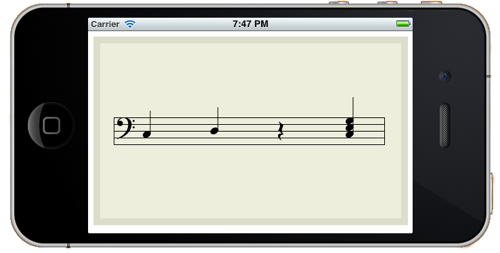
I’ll also be designing performance software for the iOS as I intend to attach an iPod touch to the trombone to serve as my heads-up display for various system states (updated wirelessly with OSC).  I’ll be controlling the iPod with a Bluetooth page-turning footswitch.  One pedal on the footswitch will change between different screens and the other pedal will activate an action available on that screen.  For instance, on the notation screen, pressing the action pedal will display a new melodic line (either algorithmically generated or randomly chosen from previously composed fragments).

Now all I have to do is build it (and they will come…  or more accurately, I will go to them).
Thursday, July 12, 2012

Bring a map

Controller mapping, the art of selecting which parameters is controlled by what hardware, has been on my mind a lot these days as I prepare for an upcoming performance as a Featured Artist at this year's Y2K Live Looping Festival in California (I'll be playing in San Jose and Santa Cruz).
Before beginning this particular mapping, I had a vision I wanted to instantiate.  I wanted a system that would allow me to quickly create complex and ever evolving loops using only words and other vocal sounds.  I also wanted to limit myself to musique concrete manipulations: Loops, cutting and splicing sounds, delay, pitch shifting and reverb.
This is the audio flow I came up with:
V set flow
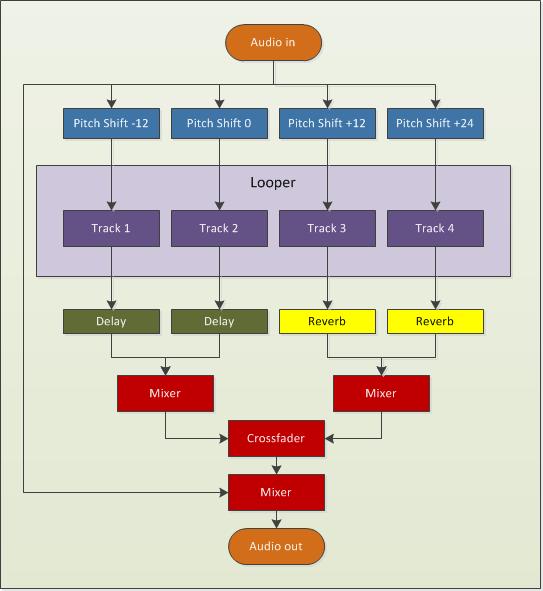
Incoming audio is sent to outputs and also split to four tracks on a multitrack looper.  Before reaching the looper, each signal path goes through a pitch shifting effect.  Each track then goes to its own post-looper effect.  Tracks 1 and 2 go to a delay while Tracks 3 and 4 go to a reverb.  Those two groups of tracks are mixed together and the result is sent to a crossfader than selects between these two sources.  The output of the crossfader is mixed with the audio input and sent out.  
My looper is Mobius.  I could’ve used another looper for this project, but my familiarity with this software and ease of implementation won out over wanting to play with another looper (I’ve had my eye on Augustus for a while).
My pitch shifter is Pitchwheel.   It’s a pretty interesting plugin that can be used on its own to create some interest in otherwise static loops.  Here, I’m only using it to shift the incoming audio, so it’s a pretty straightforward scenario.
My reverb is Eos by Audio Damage.  Do you know of a better sounding reverb that is also CPU friendly?  I can’t think of any.  My delay in this project is also by Audio Damage.  I’m using their Discord3 effect that combines a nice delay with some pitch shifting and filtering with an LFO thrown in to modulate everything.  This effect can really make things sound weird, but I’ll be using more subtle patches for this project.
To control all of this, I’ll be using my trusty Trigger Finger to control the looper and my Novation Nocturn to control the effects.  Here’s what I decided to do for looper control:
V set control
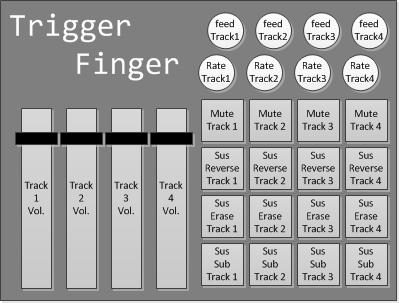
Starting on the left, the faders will control the volume of my tracks in Mobius.  The pads and rotary dials on the right are grouped by column and correspond to tracks 1 to 4.  Each button perform the same function, but on different tracks.  The bottom row of pads call the sustain substitute function on a given track.  The row immediately above it does the same thing, but will also turn off the incoming audio, so it will act like my erase button (with secondary feedback determining how much the sounds will be attenuated).  The next row up sends the track playing backwards for as long as the button is pressed and the final row of buttons mutes a given track.  The first rotary dial controls the playback rate of a given tracks and the top one controls its secondary feedback setting.
To control the effects, this is the mapping I came up with for the Nocturn:
V set effect control
The crossfader is obviously used to control the crossfader between the two track groups.  After that, each track has two knobs: one that controls the amount of pitch shift to audio coming in to the track and another that controls the wet/dry parameters of the tracks post-looper effect.  The pads on the bottom will select different plugin patches, but the last one on the right is used to reset everything and prepare for performance.  Among other things, it will create an empty loop of a specified length in Mobius, which is needed before I can begin using the sustain substitute function.  Essentially, I’ll be replacing the silence of the original loop with the incoming audio.
One thing I won’t be doing is tweaking knobs and controlling every single parameter of my plugins.  I’ll rely on a few well-chosen and specifically created patches instead.  Also, keeping the effects parameters static can be an interesting performance strategy.  When I heard Mia Zabelka perform on violin and body sounds last year at the FIMAV, one thing that struck me was that she played her entire set through a delay effect without once modifying any of its parameters.  The same delay time and the same feedback throughout.  For me, this created a sense of a world in which her sounds existed or a canvas on which her work lived.  It’s like she changed a part of the physical reality of the world and it made it easier to be involved in her performance because I could predict what would happen.  Just as I can instinctively predict the movement of a bouncing ball in my everyday universe, I became able to predict the movements of sound within the universe she created for us with her performance.
Here's a recording I made tonight by fooling around with this setup:

Tuesday, May 29, 2012

New Album Release: sans jamais ni demain

I’ve just released a new album on Bandcamp: sans jamais ni demain. It’s a collection of experimental electronic music and recent explorations. Nothing grandiose, but I felt the need to update my bandcamp and share what I’ve been working on. A little more details about the songs:

the longing for repetition


“Happiness is the longing for repetition.”
---Milan Kundera
This is a song I made for CT-One Minute. All sounds are derived from a 10-second bass clarinet phrase sample that can be downloaded freely from the Philharmonia Orchestra's website. The sample was played back at various playback rates, forward and backward, through various envelopes using the Samplewiz sampler on my iPod. This performance was recorded in one take with all looping and effects done in samplewiz. No further editing or effects except for copy and pasting the beginning at the end to bring closure to the piece.
I approached samplewiz as a livelooper, since, in "note hold" mode, every note on the keyboard can be seen as a track on a multi-track looper (each with a different playback rate). For this piece, I used the forward and backwards loop settings in the wave window, so things get go sound a bit different. I added some delay and messed with the envelope and it started to sound nice. Once I had a good bed of asynchronous loops, I left "note hold" by tapping rather than swiping the control box (this kept the held notes). I then changed the settings around and played over the loops without "overdubbing".
Samplewiz is quite powerful... You can also change the loop start and end points in between notes to add variety, without affecting the notes that are already being held.

tutus de chemin


This is the soundtrack for a short film I made in a weekend with my wife. I started with a vocal recording of my wife that I sent through Paul's Extreme Sound Stretch. The resulting audio file was played back as a looop in Bidule. I sent the audio to a pitch shifting plug-in (I believe I was using PitchWheel at the time) and then to a midi gate group and finally to the Mobius looper. I performed the sounds two-handed on my Trigger Finger. One hand was controlling a fader that was assigned to pitch shifting and the other was triggering pads to control the midi gate (the note envelope) and various functions in Mobius.

Three of a kind


This piece started out as an assignment for a course in Electroacoustic composition I took at SFU a few years ago.  The sound source was a homemade instrument, but everything was mangled and cut-up.  This piece features heavy use of the short loop fabrication technique familiar to readers of this blog.  I used Acid to assemble everything and add some effect automation throughout the piece.

le train


This is the soundtrack to a short animation film I made last year.  I used Soundgrain to isolate parts of the original sound's spectrum and used that software to create loops that I mixed  while recording.  I think this musical cutup is well-matched with the visual cutup it was meant to accompany.

Game music


This songs was made using my soon to be released iOS app: BreakOSC!  This app is a game that sends OSC messages based on in-game events.  In this case, when the ball hit blue and green bricks, Bidule triggered four instances of iZotope's Iris.  The paddle served as a cross-fader and mixed all those sounds together.  The results were sent to a generous amount of reverb courtesy of Audio Damage's Eos.

sans jamais ni demain


Another composition I made for the aforementionned course in electroacoustic composiiton I took at SFU.  The only sound source for this piece is a recording of myself reading an old poem I wrote in high-school.  The slow moving textures were made by isolating parts of those words, slowing them down and layering them over each other to create very long notes of varying pitch that fade in and out over time.  The more rythmic stuff I made using a now familiar technique.

July 8 2011


This piece is a recording of a live (from my basement) performance of what will one day become my meta-trombone.  A short loop is created at the top (what is heard twice in the beginning) and then altered in different ways determined by trombone performance.

Twice through the looking glass


This song was also made for CT-One Minute using the exact same sound source as the longing of repetition. This time, however, I used Iris to change the character of the sound and created two different sound patches.  I made two recordings with each of these patches by triggering the sounds with my new Pulse controller.  My three-month old daughter also took part by adding her own surface hitting contributions, making this our first father-daugther collaboration.  Once I had made these two recordings, I brought them in Bidule and placed them into Audio file players.  The amplitude of output of each player was controlled via faders on my Trigger Finger and the result was recorded to file.

Wednesday, May 2, 2012

Displaying musical notation in iOS


musical notation on iOS

In case you're wondering, the easiest way I've found to display programmatically generated musical notation on the iPhone is with VexFlow.  It's a javascript library, so this means I have to put it in a UIWebView object through an html document that loads all the relevant files.  To call the javascript functions, I send a stringByEvaluatingJavaScriptFromString:  message to the UIWebView object.  It all works very well, so that takes care of the uninteresting part of that project…  now I get to learn all I can about algorithmic composition!

Wednesday, April 18, 2012

News from the trenches of augmented instrument design

Hey folks, out here in the perimeter, things are coming together.  I purchased an Arduino and an ultrasonic rangefinder and I hope to have them talking to each other soon.  Meanwhile, I’ve been exercising my iOS development chops in a few different ways.

First, working with libpd, I’ve built a rudimentary iOS music application that sends OSC messages to my computer.  This is a simple app that I made to see how hard it would to develop an iOS app to take care of the OSC messaging coming from the meta-trombone.  The good news: libpd is awesome and quite easy to integrate into an iOS development project.

If you’ve been living under a rock or you’ve somehow missed the Pure Data renaissance, libpd allows developers to embed a pd patch within an application.  I can create all the MIDI/OSC and audio elements graphically within pd and embed that within an iOS app.  All I need to do is make the user interface send messages to the pd patch (and back the other way as required).  This significantly reduces the learning curve for creating music apps for iOS.

This brings us to my second iOS project.  I’ve been designing a game that sends OSC messages based on in-game events.  The user can setup the game levels and specify what OSC message is sent for each in-game event.  For instances, if two objects collide, a note is played.  Likewise the position of an object on screen can be mapped to parameters of an effect.  I don’t want to give away too many details on this one yet, so stay tuned for details (and let me know if you want to beta test).

My third iOS project sends and receives signals to and from the Arduino through the RedPark serial cable.  I’m quite excited about what this makes possible… any sensors and all the world of physical computing over which the arduino reigns can be incorporated into an iOS app.  If you’ve been paying attention, combining that with libpd allows for a very compelling array of possibilities.  Here’s the picture: the arduino handles the sensors and sends signals to your iDevice, which is used for display, input, networking, audio generation, playback and DSP.

From the start, I intended to use an iTouch in my meta-trombone project.  At first I thought I would use it as a heads-up-display and as an input device to select patches using touchOSC.  It’s becoming clear that it will do a bit more work…  my current approach is to use the arduino to determine slide position and trombone notes.  The iTouch will receive this information through the RedPark cable and send OSC signals to my MacBook based on the patch selected through the user interface of the software that it is running.  The iTouch will be mounted on the trombone close to my eyes.  I will navigate the user interface with a footswitch, with a key/joystick in my left hand and/or with its touch interface.

The iTouch will also display algorithmically generated notation based on the last couple notes I played (and/or previously composed fragments).  I find the idea of using notation interesting, since, for the meta-trombone, traditional notation will not only describe musical motives, but parameter changes as well.


Friday, October 14, 2011

Fall odds and ends


Internet woes
The internet has not been all good to me recently. I often shop online and encourage everyone do so, but when things go bad, it can (apparently) be a pain to get your money back.

My first (and second) internet mishap happened while I was trying to buy an RME Fireface 800 on Ebay. On two separate occasions, after winning the item and paying through PayPal, Ebay removed the listing because they suspected it was fraudulent. I got my money back in full in both cases, but it took a couple weeks for PayPal to go through its formal complaint process. Weeks during which my money was tied up and I couldn't use it to buy a Fireface 800. After going through this twice and suffering through another bad experience (see below), I decided to buy a new interface from a Canadian store. The transaction went smoothly and I had the interface within the week.

Internet woes (Part II)
My internet misfortunes continued as a result of a transaction I initiated in late June when I ordered a mute from an online retailer. This mute has a microphone pickup inside it and I intended to use it in my meta-trombone project, so I was quite keen to get it (and very happy to find a retailer in North-America). But it wasn’t coming. So I contacted the seller in July and again in August. By mid-August I wanted my money back. When I received no reply from the seller, I lodged a complaint with the Better Business Bureau and informed the seller. No reply from the seller.

Early in September, I reviewed the seller’s novel approach to customer service on an internet forum and I informed the seller. The seller promptly went apeshit. Whereas he could’ve taken this opportunity to renew communications with me and apologize for missing my previous correspondence, he called me a liar and publicly insulted me on the forum. Certainly not the professional behaviour one expects from a seller… Regardless, the seller agreed to refund me (less restocking fees). However, the seller also sent an email to the Better Business Bureau impersonating me in which ‘I’ apologized and withdrew my complaint. I won’t actually name the seller (due to repeated threats of legal actions), but I would encourage any reader to contact me before placing any significant order for musical equipment from an online retailer located in the north-eastern United States.

Computer woes
One thing you shouldn’t do with your MacBook Pro is to drop it on the floor. Take my word for it. No need to try it for yourself. This could’ve been much worse, but I got off with cosmetics bruises and a dead hard-drive. This is not too problematic, since I’m rather paranoid about backing-up my data. Up until now, I’ve been using CrashPlan to backup my main drive and while I thought it worked quite well, having spent some time with its restore function has made me yearn for another approach. I’ve since switched to Carbon Copy Cloner and I heartily recommend it for all your OS X backup needs. The best thing about it is that it creates a bootable duplicate of your disk. This means there is no down time and no need to reinstall software (and search everywhere for licence information). Also, it doesn’t put your files in an undecipherable proprietary format that makes it impossible to locate files without using the software in question (that is so 20th century).

Learning stuff
Having successfully demonstrated competency in rudimentary university-level mathematics, I’ve started learning computer programming at l’Université du Québec en Outaouais (in accordance with my previously mentioned epiphany). I’m currently enrolled in the introductory Java programming course, but after going through the Stanford introductory course, this one is a breeze. Feeling inadequately challenged, I also signed-up for a free online course at Stanford in artificial intelligence. I’m one of 180,000 or so students enrolled. That’s nuts.

I’ve also been teaching myself to code in Scheme. Not only because it’s the coolest programming language I’ve ever seen, but mainly because it’s the lingua franca of livecoding (see Impromptu comments below).

To solidify my hold on both mathematics and programming, I’ve been using Java, C++ and Scheme to solve mathematical problems posted on Project Euler. I’ve only solved 19 problems to date and I wish I had more time to spend on these, since it’s great fun, it makes me feel smart and I’m learning stuff. What else can you ask for?

Meta-trombone
Not much development since I last posted about the meta-trombone, but a lot of conceptual work happening behind the scenes (mostly thinking about effects). I’m now very interested in Impromptu and its novel blend of coding, AudioUnits, OSC and MIDI. I’m not sure exactly how it will be involved in this project, but I know it will be. One thing that Impromptu allows is to rapidly create AU by compiling using its AU wrapper. This would make it possible to create some signal processing wonders of my own and also to implement some of my Bidule patches as compiled code, thus increasing efficiency. Normally, there’s little drawback to using Bidule, but my audio to midi patch is a bit of a drain on the CPU and could be improved by moving it to Impromptu. This livecoding platform also has some interesting video applications that I’m more than willing to explore.

Camera (film)
I purchased an old canon film camera and a couple of lens online and found an old light table locally. I’m amazed at how cheaply this equipment can be had… an equivalent digital setup would’ve meant an investment of several thousands of dollars. For a bit over $200, I have seven lens, an SLR and a light table. Amazing.

My main reason for getting these technological vestiges of a previous century is to further explore a collage technique that I learnt from Collin Zipp when I attended a workshop at Daïmon. During this workshop, I created a little video from cut-up and scratched film negatives. While the video is ok, what struck me was that a lot of the individual frames made stunning images in themselves and I’d like to explore that in the coming months, perhaps using this technique to create a short comic.

Saturday, July 9, 2011

Meta-trombone - part II

These last few weeks have seen much development on software side of the meta-trombone controller.  I created a monstrous Bidule patch to instantiate my vision of what this integrated controller/instrument should be.  

Here's a top level view of the patch:


The audio signal from the trombone goes to an audio to midi converter that I developed to extract midi notes from my performance.  It also goes to external outputs and/or Mobius looper through an audio matrix that makes possible all the complex routing that my setup requires.  Finally, trombone sound is also fed to an envelope follower that, depending on performance mode, can modulate the playback of Mobius' tracks (more on this below).

Here's a look at the top level of the audio to midi group:

This group is based on an audio to midi converter I found on the Bidule forum.  From what I gathered looking at this group, it seems to determined pitch by comparing incoming notes to a delayed version.  The amount of delay is based on frequency and sampling rate.  When the two signals are combined, if the frequency matches what was fed to the delay, they are phase-cancelled to near 0.  This process is done for every note we want to evaluate and the note closest to 0 is the one returned.  

The original group work well enough, but it was a bit sluggish for my taste and used up considerable system resources.  My approach, as I indicated earlier (and as implemented by students at Cornell), is to reduce the number of notes the system has to evaluate by tracking the position of the trombone slide and evaluating only for those notes that can be produced at the current slide position.  I'm still working on a reliable way to track slide position, but right now this audio to midi converter works quite well for all notes in first (closed) position.

The midi notes that it generates are sent to Mobius to trigger various scripts depending on the performance mode currently selected.  Before I describe these various modes, let's take at the control interface that I created in TouchOSC that allows me to control this complex patch with my iPod Touch.


The first column to the left selects the performance mode.  The one immediately to its right selects the Mobius track that is effected by the performance mode.  The red column selects the Mobius track that will record performance from either the trombone, an effected Mobius track or both.  The last column on the right turns the audio output for that track on and off.  Finally, the purple button on the bottom determines wether trombone sound is sent to external outs and Mobius tracks.

While this interface may look simple enough, there are many logical conditions that are evaluated behind the scenes each time a button is pressed.  For instance, if Play 1 and Rec 1 are selected, the audio from track 1 is not actually fed into itself.  If Rec 2 is selected and Out 2 is off, the system turns it on automatically.  And so on...  these logical conditions are the core assumptions I built into the system that will make it behave as I intend it to.  A big part of that, was defining how the performance modes would affect the various system states to produce the required results.

Performance modes
Starting with the simplest, in Off mode the midi notes interpreted from the trombone performance are discarded.  In synth mode, the notes played on the trombone modify the playback rate of the Play track in Mobius.  Also, the playback of that track will be modulated according to the trombone performance by virtue of the envelope follower.

In Envelope mode, the track playback is also modulated to the envelope follower, but the midi notes no longer change the playback rate.  Instead, each note played on the trombone changes the playback location of the loop.  Trigger mode is the same as envelope mode, but without the envelope!

Things to do
I still need to complete the pitch recognition system by developing hardware to track slide position.  I also need to develop the midi module element of the system.  Presently, I'm thinking of adding an arpeggiator, a quantizer and perhaps a midi looper.  Next, I will add effects!  Not only do I want to modify the input trombone sound and the loops, but I also would like to map trombone performance to changes in effect parameters and effect selections.  For instance, I could map a filter's cut-off frequency to trombone notes so that playing a certain note would emphasize a specific spectral aspect of the effected loop.

How will it sound?
While there's no way no know exactly what kind of music I'll end up producing once the whole system is up and running, below is a recording of a recent practice sessions that used only the Synth and Envelope mode.  No effects were added and it is rather poorly mixed, but it does, I believe, show promise.  One thing I'd like to note about the performance is that everything you hear, with the exception of the solo later on in the piece, is created from "performance" of the first recorded loop (what you hear twice in the beginning).

Wednesday, June 8, 2011

Playing the loop


After watching the video above, I started fooling around with this technique in Ableton. Using recordings I made with Big Band Caravane in 2006 as a starting point, I isolated the beginning of phrases and swells instead of drum sounds as Thavius Beck does in the video.

Here are some results:


Livelooping application
As fun as it was to pretend to be a dj for a couple afternoons, my musical path does not lie in that direction. I quickly began to consider ways I could apply this technique to a live recording in a given performance. Now, I know there are easy ways of doing this with the full version of Live (clip to midi controlled rack instrument), but I’ve been reticent to upgrade from my free watered-down version in part because I believe a new version is just around the corner, but mostly because I want to limit the number of software I’m using in performance. So far, I’ve been able to do everything with Bidule and Mobius and I’ve only looked at Ableton to work out performance strategies and to try out ideas I find on the web.

Fortunately, it turns out it is easy enough to tell Mobius to trigger a loop from a certain point. The following script will trigger playback from 4/16th of its length:

!name trigger4
Variable newFrame loopFrames / 16 * 3
move newFrame
end
I wrote sixteen scripts like the one above, with different values, and assigned each one to a pad on my Trigger Finger using MIDI binding. Once a loop is recorded, pressing a pad triggers playback from one of sixteen positions relative to length. If I have a one bar loop, that’s every 16th note. Four bars will give me a trigger point at every beat.

Here are some results using that approach with a song from my homage to the cookie monster:


I’m quite excited about the possibilities this technique highlights. I quickly came up with new and interesting ideas using old ones. I found this process of creating from existing material very much in line with my current interest in collage in comic books and video.

Meta-trombone
If anything, these new experiments have only further revealed the need for an integrated instrument/controller: the meta-trombone. My current vision is to make those loop points trigger according to what notes I play on the trombone. After recording an initial loop, this would allow me to continue to play a ‘duet’ with myself since every note played would have a double purpose, serving both as musical material and trigger signal.

Technically, the challenge is to interpret the notes I play into MIDI notes. This is a rather complex problem to solve if I ask the computer to determine the note played from any of 30+ possibilities, but it becomes easier if I narrow the options to something more manageable.

One way students at Cornell have tackled this problem in the case of a MIDI trumpet was to split it in two. First, they developed a system to determine which valves were activated. This limited the number of possible notes (8 or so) and they were then able to track the notes being played.

I intend to take a similar approach for my meta-trombone controller. I’ve already had good results tracking the notes I play in 1st position using Bidule and I think I can scale this up to all positions, provided that I can find a way to determine slide position.

Thankfully, I’m not the first person to tackle this problem and I found some interesting experiments online. The first I looked at was Nicolas Collins’ Trombone-Propelled Electronics (and its various incarnations). To track slide position, Collins cleverly used a retractable dog leash to turn the knob on an optical encoder (figure 4 in the pdf). I considered using a similar approach using string potentiometers, but I was unable to find one with a string tension that would not impede playability.

The wireless options I’ve encountered used either optical or ultrasonic sensors. The composer Marco Stroppa’s work "I will not kiss your f.ing flag" called for an augmented trombone that would use the slide as a continuous controller to change parameters during performance. The solution adopted was to place a red laser light emitter on the outer slide (the moving part) and a photo-electric diode receiver at the fixed end. However, the article seemed to indicate the reliability of the system could be improved.

Ultrasonic emitter and receiver pairs seem more promising. A study trying to link technical ability and movement efficiency in trombone playing had success with an ultrasonic sensor, noting that the system they developed was lightweight and did not detract from playing. They placed an emitter/receiver paired unit at the end of outer slide and (from what I can tell) they measured the distance the sound travelled from the emitter to the receiver, bouncing off the player on its way.

Neal Farwell developed multiple technical systems to adapt the trombone for the electro-acoustic performance of his Rouse. One of them, called the uSlide, is a pair of ultrasonic emitter and receiver that tracks slide position. His approach is different from the one above, since he put the emitter on the outer slide and kept the receiver fixed near the mouthpiece. This seems a more robust approach, but I’ll have to try things out.

Also of interest, the trombone instrument from the Imaginary Marching Band project tracks “slide” position with a ultrasound sensor connected to an arduino. The open-source software developed for the arduino outputs MIDI note information (including pitch bend).

There may be ultrasonic sensors in my immediate future…

Monday, March 28, 2011

My greatest hit

This little video of mine has recently went over the 5,000 views mark.


This is by far the most interest anything I've ever produced has managed to generate. I don't think anything even comes close...  certainly not my ode to the cookie monster or any of my other videos on youtube.

So what made this my biggest 'succes'?  

I'm not sure...  But I know it's not my marketing strategy. I haven't done anything to promote this video (or anything else) beyond uploading it to youtube and adding some tags. This strategy has not generated much viewership for my other videos, so there has to be something about this one that makes it stand out.

Let's see...  It's an animated bust of a nude study in blue conté with a computer generated voice (out of sync with image) telling people about stoicism and existentialism featuring some symbolic logic and my terrible handwriting. The whole thing is technically embarrassing and was likely the result of an afternoon's work (I don't actually remember the circumstances surrounding the creation of this animation).  

So, I'm thinking subject matter is probably a key factor here...  

I got a fortune cookie once that read something like: "The philosophy of one century is the common sense of the next (in bed?)." Now, as any student of philosophy will tell you, there weren't any single dominant philosophy in the twentieth century. Quite to the contrary, there has never been so many people actively involved in philosophical activity, with different viewpoints, opinions, stances...  it's been a very interesting hundred years and you could probably spend a lifetime studying the very recent philosophical past (some lucky people do). However, one philosophy (for lack of a better turn of phrase... it seems odd to count philosophies) that resonated particularly well with people in the twentieth century was existentialism.

One can argue that existentialism has become the common sense of this century. After all, it does seem obvious that you are define by your actions, not by your intents and that the disconnect between what you want to be and what you are or between what you want the world to be and what it is can bring about all the agony familiar to those in the throes of an existential moment.

What I find particularly interesting are the demographics of the viewership. While males of all ages (68%) viewed my video, it is interesting to note that most of the female viewership are teenage girls. I really don't know what to make of this, but I find it interesting nonetheless.

A couple key findings, when I compare the popularity of this video with my other youtube offerings:

  • build it and they will come (even if you dont't tell them about it);
  • english is the language of the web (french is mostly ignored);
  • if content is interesting, people will overlook technical flaws in presentation;
  • folks like their animation;
  • most referrals come from Youtube related videos.
This last point highlights the importance of tags and adequate descriptions...  I'll have to work on this. But mostly I believe the key is subject matter, since this is what drove the related video referrals in the first place and brought me the bulk of my viewership.

Saturday, February 5, 2011

Sampling and sound design with Mobius

Lately, I’ve started exploring the use of the Mobius looper as a sampler to create new and interesting sounds to be triggered by my guitar controller. By doing this, I hope to recreate, in a live setting, a technique I developed in the studio that allows me to create a pitched sound by taking a very short part of a recording (usually vocal) and repeating it many times. I like to think of this as a type of granular synthesis, although, strictly speaking, it's not.

Start with a short loop

The first step is to create a short loop in Mobius. The best way to achieve this is to use Sustain Record, since this function only records when the button is activated and automatically stops recording when the button is released. At this point, you should have something that might sound like this (if you were to sample my voice).


Interesting, but since the repetitions aren’t fast enough, it doesn’t sound like a musical note. There are two ways to make the repetitions faster. We could increase the Rate of playback, which increases the speed at which the loop is played, or we could make the loop even shorter, thus increasing the frequency of repetitions. There are many ways of doing this, but my favourite so far makes use of the loop windowing script Jeff Larson put together. Activating this script selects a single subcycle to play back. Using the script again selects another subcycle. In this way, a single loop can yield many different sounds. Here’s how things sound at this point using both of these options on the above loop.


Well, at least we have a tone!

Sound design

There are countless possibilities to further manipulate these sounds, both in and out of Mobius. For now, I’ve limited myself to three plugins: Discord3, Chopitch and UpStereo. Discord3 is where the meat of the sound design is taking place. It is a formidable effect that allows me to introduce a lot of complexity to any sound. While Chopitch adds character to the sound, its primary role is to shift the pitch of Discord3’s output according to the midi signals sent from my guitar controller. The last plugin, UpStereo, increases the sound’s presence in the mix.

There are also some sound design possibilities within Mobius itself. For instance, the sample can be changed by sampling over the existing loop using Replace (with no Secondary Feedback). When this is done with a rate-shifted short loop, the results are rather interesting. Because the repetitions are occurring at a sufficient frequency, we retain the perception of a tone, but the sound in the loop is no longer rate-shifted and retains more of its initial character.

Another option is to briefly overdub the loop to add further complexity to the sound. However, it is important to pay close attention to the Secondary Feedback setting while doing so, since things can easily get too loud when overdubbing such a short loop at full feedback.

It’s interesting to try out some functions and scripts to hear their impact on the sound. Halfspeed, as expected, will lower everything by an octave. Using the previously mentioned loop windowing script on a rate-shifted loop will produce a wispy high tone. Using a version of this Auto Reverse script will add a lot of ‘dirt’ to the sound.

Sound examples

These examples all start from the same short loop recorded in Mobius.

Example 1: Loopwindowed ->Discord3 -> Chopitch -> UpStereo


Example 2: Loopwindowed ->AutoReverse  ->Discord3 -> Chopitch -> UpStereo

Example 3:Loopwindowed ->Rate+24 -> Discord3 -> Chopitch -> UpStereo


Example 4:Loopwindowed ->Rate+24 -> autoReverse -> Discord3 -> Chopitch -> UpStereo

Example 5: RateShifted -> Discord3 -> Chopitch -> UpStereo


Example 6:RateShifted -> autoReverse -> Discord3 -> Chopitch -> UpStereo


Example 7: RateShifted -> LoopWindowing -> Discord3 -> Chopitch -> UpStereo


Example 8: RateShifted -> Overdub -> Discord3 -> Chopitch -> UpStereo

Friday, January 28, 2011

Computational Epiphanies

A few weeks ago, I came to the realization that all my endeavours are not as disparate as I had previously thought.  There is one thread that runs through all of my interests and that could be used to weave a coherent story from my seemingly incompatible creative output.  I've realized that my writing, my drawing, my music and my video work all involve a computer and would not be possible without a computer (at least using the methods I've developed and on which I presently rely).

This may appear trivial at first glance.  After all, a great many people use computers on a daily basis to do a lot of different things.  What I find interesting about this insight is that it can help me overcome one lingering problem with my refusal to specialized: the impossibility of dedicating enough time to completely master any subject.  It's not that I'm lazy, but there's simply not enough time in a day to do it all at once.

However, I've previously learned that working on general skills (reading, writing, mathematics, logic) can yield benefits in all areas of interest.   It's becoming clear to me that becoming a better computer user would make me a better composer or writer (or comic book artist or video filmmaker).  This is why I've decided to dedicate a large part of this year's free time to learning the fundamentals of computer programming and software engineering.

I know some may be scratching their heads at this point, wondering how computer programming will make me a better musician/composer, comic book artist, writer, or filmmaker.  Well, I'll try to explain...

Computers and music

This should be an obvious one given my current musical obsessions.  More and more, I'm thinking about how to use my computer in novel ways to create interesting music both in performance and in the studio.  Lately, working with Max/MSP or Bidule, I've often wished I were better at coding to create either plugins or software to help me realize my musical vision.  And don't get me started on live coding (man that looks like fun, look at the video below).  To help me get there, I've started working through a wonderful book I recently purchased: The Audio Programming Book.


Algorithms are Thoughts, Chainsaws are Tools from Stephen Ramsay on Vimeo.

Computers and visual art

This is another field where computers have become indispensable.  Knowing how to program would not only mean that I could write some JavaScript to automate fonctions in Photoshop, but I could also write plugins or standalone software that would interact directly with the images.  Already, with my beginners' knowledge of Java, I was able to write a few simple programs that performed operations directly on the pixels of an image (moving them, changing colours, replacing them with pixels from another image).  There's a lot to explore on this front.

Computers and writing

This is one area where even my most favourable readers might think I shouldn't expect to gain any benefits from learning to program.  I'll happily grant that there hasn't been very much development in terms of digital creative tools for literature, but I've had an interest in computer generated (or assisted) prose and poetry since reading Charles Hartman's Virtual Muse about three years ago.  Hartman, under the influence of John Cage, is interested in using computers to introduce elements of chance and randomness in the writing process.  He wrote programs that either randomly reordered previously written lines or that generate grammatical sentences based on syntactical templates and a lexicon.  He would use the result to shake things up and generate new thoughts, in effect collaborating with the computer.

I would prefer to adopt an approach similar to how we think of musical filters and effects in music production.  An input text would be effected by a program following a set of instructions before displaying the result.  I've recently become aware of the work of  Daniel Howe whose RiTa toolkit for Java (as presented in his doctoral dissertation) aims to give writers the resources to harness the power of computation to produce prose and verse.  There's also the folks at the Expressive Intelligence Studio at UCSC and the group running Grand Text Auto that bear watching.

Computers and computers

For all these reasons, I'm very excited about learning to code.  In fact, I've already started by following introductory lectures in Java programming from Stanford University.  This class has been great so far and I quite enjoyed coding my own version of Breakout and some other fun games.  I'm grateful to Stanford for making these courses available freely and I intend to go through all the lectures for the introductory classes and, in time, some of the more advanced stuff as well.  I've also signed up for a certificate in information technology at l'Université du Québec en Outaouais and I'm working through the math pre-requisite this semester.

Thursday, December 16, 2010

Guitar controller part IV

Yet another instalment in my guitar controller saga…  technically, this project is done.  Everything works as it should, however there’s still some cosmetic work left to be done.  You’ll notice it is still unpainted and the top part of the controller’s body is held in place with an elastic band… not optimal.

But it does work and here’s proof:

Jamming on the guitar controller

This controller is nothing by itself but a bunch of buttons.  It only sends out MIDI notes and to achieve anything beyond that requires some programming.  For this, I once again turned to Plogue’s Bidule

In the patch I made, the neck buttons were divided into three groups that randomly select audio files for playback from three different pools: subjects, verbs and complements as spoken by my wife.  That gives four buttons per grammatical groups and I decided to exploit that by assigning a different playback speed to each of these buttons.

The three central buttons on the guitar controller’s body trigger playback of the selected sound file.  Pressing a neck button by itself only selects an audio file and does not produce a sound until one of the trigger buttons is pressed.  The first two trigger playback from the beginning of the file and the third button triggers in reverse from the end.  One thing I’d like to try is setting one of the first two buttons to pick a random start position…  it might introduce some interesting possibilities.

This is how I implemented the guitar analogy for this patch.  Pressing neck buttons is analogous to fretting a string (select audio file), while pressing trigger buttons is akin to picking notes.  Together, these two actions produce a given sound.

The sounds are fed to the Mobius looper, which I control with my feet through my Trigger Finger.

Friday, November 19, 2010

Guitar controller – Part III

A quick update on the guitar controller to say that this project is going quite well. I’ve decided to forget the hacked USB keyboard approach since I couldn’t fix the latency issue. I bought a midi CPU from Highly Liquid and I’ve no regrets. This will give me a more stable controller down the road.

I also bought some low profile arcade buttons, since I was unsatisfied with all other SPST switches I’ve come across These switches have amazing response, require little effort to activate and jump back to open in a flash.

Next: Wiring all buttons on the neck, installing buttons on the guitar body and finding a tilt switch.

Monday, November 1, 2010

Dr. Sketchy

Last week, Carole and I attended the first anniversary of the Ottawa branch of Dr. Sketchy’s Anti-Art School.

Dr. Sketchy was founded in Brooklyn by an art school drop out and branches have been established all over the world.  Dr. Sketchy invites artists and amateurs alike to draw the human form.  Models are usually burlesque performers whose elaborate costumes certainly provide a break from drawing naked people.  I can certainly use the life drawing practice…

Models took poses for progressively longer times, from 30 seconds to 20 minutes (which, for me, is either too short or too long).  Here are some of my more deserving efforts…  I’ll keep the rest to myself.


twins high-walker mc

clown

I tried to make a more finished drawing from that clown sketch above:

clown-for-web

I’ll try to make it back to the anti-art school next month, after all the tuition is pretty cheap and I can use the practice.

Monday, October 11, 2010

Des chemins et des ruines

Last week I finished my second contribution to Les Fumettos du Cyclope (300 pages of cutting edge graphic narrative to be published in mid-December by Trip).  Both of my stories for this book explore philosophical themes and I’m considering writing a few more like these and publishing them together as my philosophical comics. 

My first contribution, À lire en cas de crise existentielle, is a first-aid kit for those suffering from an existential moment.  It is loosely based on an earlier short animation film became my biggest hit on YouTube.

My second contribution, Des chemins et des ruines, is also based on an early short film.  In it, I draw parallels between Socrates’ acceptance of his death sentence to remain faithful to his principles and the dilemma a young divorcé faces when she can’t reconcile her vow to live with her husband “until death” and her present situation.  This comic asks the big question: must we die for our principles?

My personal answer will always be an echo of George Brassens: “Mourrons pour des idées d'accord, mais de mort lente.”

Here are a few images from the finished story and their corresponding thumbnail sketches.  The thumbnail sketches are quite small compared to finished page (about an inch high),  I do them quickly while I’m writing the script to help me visualize how the page will look and to know if I've put too much on a given page.


page-2 

 page-3

I inked these pages on the computer using Manga Studio and Photoshop in a traditional ligne claire style.  Instead of colouring them, I scanned different fabrics and created a digital collage with them.  Originally, the line drawing was supposed to give the outline to make that fabric collage and I wanted to remove the line drawing after it had served its purpose.  However, I decided to keep them in the interest of legibility. 

 page-2page-3


The tarot cards are small paintings on canvas paper I did with acrylic, gouache and ink.

By all accounts, Les Fumettos du Cyclope will be an amazing art book and I’m thrilled to be a part of it.  I look forward to the book launch party at Le Cheval Blanc on December 18.  See you there!

Monday, September 27, 2010

Guitar controller – Part II

I got a used guitar hero controller for 10$ and hacked it to pieces… I salvaged the buttons and the strum bar and I temporarily hooked them up to the USB interface I previously gutted from an old keyboard. This allowed me to test everything and work out the software side of the system.
I’ll be using Bidule to interpret the signals from my guitar controller. I created the following patch to test out the concepts.
bidule-for-keys
Bidule recognized my controller as a keyboard, so I added a HID-Extractor and selected the keyboard as input and Bidule automatically assigned a MIDI note to each keyboard key. The first stop after the HID-Extractor is a midi note filter that lets through only the notes associated to my controller. This is required because Bidule doesn’t seem able to differentiate between keyboards and any stray typing on my main keyboard would otherwise pollute my MIDI signal chain.
After the Note Filter, I added a note remapper.  Since the HID extractor automatically maps each key to a midi note, this step is required to create a more meaningful association.  For this test, I only used four buttons and mapped them chromatically from C4 to D#4.  Later on, I intend to use a midi router to switch between different mappings.  For instance, I could have one that moves in thirds, or in fifths.  A button on the guitar body will allow me to select between these different mapping options.  The guitar frets on my controller will not be limited to chromatic playing and I’ll even be able to program various scales and arpeggios.
These midi notes are being fed to Pitchwheel, a pitch shifting plug-in that is effecting the playback from the Audio File Player.  For this test, I used an ambient drone loop.  Pitchwheel responds to midi notes by shifting the pitch of the audio input in steps corresponding to these midi notes, C4 being the origin.
I sent the output of this plug-in to a Stereo-Mixer to have a way of gating the output.  What I wanted to achieve was to hear playback only when I pressed on the strum bar.  I did this by muting track 1 and linking the mixer’s track 1 solo parameter to the appropriate keyboard key triggered by my controller.
The output of the mixer goes to a reverb effect before reaching the sound card to add a bit of realism to the sound envelopes.  When a note is played on an acoustic instrument, the sound doesn’t end abruptly after the player stops.  The note vibrates within the instrument and the room for a while before dying out.  The reverb plug-in allows short notes to sound more realistic.
Here is a little recording of a test I did with a similar setup.  Basically the same but with midi notes transposed down an octave to sound more bass-like and mapped to arpeggio instead of chromatically:


There’s a latency issue on the strum bar that I’ll have to resolve, but otherwise everything is behaving as it should. 

Next steps: More guitar hero controllers will be destroyed.


Tuesday, September 14, 2010

Guitar controller – Part 1

I’ve taken apart an old keyboard to scavenge the analogue to digital converter and the USB interface (the green board in the picture below). I followed parts of this excellent tutorial to get me started on this project.

DSCF0199

Keyboards are rather simple circuits. There two groups of pins (top of the green board above) and every key is connected to one pin from each group. When a key is pressed, a circuit is closed between a unique combination of pins and the chip interprets that pin selection and sends the appropriate signals via the USB interface.

DSCF0200

So far, I’ve soldered connector wire from both pin sets to a project board. I selected four from one side and seven from the other, for a total of 28 unique combinations, which should be more than sufficient. I’m thinking of having 12 buttons on the guitar neck and a few on the guitar body (including the strum button). I’ll connect buttons to the project board in columns, according to their pin assignments.

Next step: finding switches!

Monday, September 6, 2010

Things, unfolding

What to write about this week, it seems everything is happening at once… let’s see:

Guitar controller

I’ve decided to create a guitar-like controller as an intermediary learning experience before tackling the meta-trombone project I previously described. Mr. Funk’s own guitar controller (video below) is quite remarkable.


Where he cobbled together a nice collection of hardware components (an Electrix Repeater, an Alesis AirFX and what looks like the remnants of a midi keyboard) I would prefer to keep my “guitar” small and adaptable by making it a general purpose controller for computer music.

I’d like to cannibalize a USB keyboard for parts to provide the interface between the controller’s buttons and the computer as described in this tutorial. A guitar hero strum button would be placed in the middle of the controller to be activated by the right hand. I’d place a row of buttons on the guitar neck to be activated by the left hand. I might also include some mercury switches to determine the orientation of the neck. On the software side, I’d use Bidule to interpret the commands into MIDI signals to control parameters of effects and playback of music.

One obvious use of this controller would be to use it to ‘play’ a sound or a loop as a guitar. The strum button would control a gate filter, letting sound through only when it is activated by the right hand. The left hand buttons on the neck could control a pitch shifting effect. Combining the two should result in a single string guitar that can produce sounds from the playback of any sound source.

Metatrombone and trombone controllers

My research has turned up some interesting experiments in creating electronic musical controllers based on the trombone and an extended trombone instrument called the Metabone. However, just like Nicolas Collins “trombone-propelled electronics”, both of these experiments do not use the actual trombone sounds acoustically, as I intend to do.

Trombone, non-meta variety

I’ve started playing with the Music Conservatory’s Big Band last week and I’m pretty confident this group will be swinging in no time. It feels pretty good to be playing with others again and I look forward to learning some new charts.

Bédé

Earlier this year I was invited to participate in a forthcoming (December) sequential arts publication called Les fumettos du Cyclope that will showcase experimental and cutting-edge comics from both emerging and well established artists. My two contributions will be philosophical in nature, one is a first-aid kit for an existential crisis and the other is based on one of my early short films inspired by the events leading to the death of Socrates. I have to complete everything by the end of the month, so no time to waste on that front.

That’s pretty much it, aside from the constant demands of wedding planning…