Showing posts with label musique concrete. Show all posts

Thursday, July 12, 2012

Bring a map

Controller mapping, the art of selecting which parameters is controlled by what hardware, has been on my mind a lot these days as I prepare for an upcoming performance as a Featured Artist at this year's Y2K Live Looping Festival in California (I'll be playing in San Jose and Santa Cruz).
Before beginning this particular mapping, I had a vision I wanted to instantiate.  I wanted a system that would allow me to quickly create complex and ever evolving loops using only words and other vocal sounds.  I also wanted to limit myself to musique concrete manipulations: Loops, cutting and splicing sounds, delay, pitch shifting and reverb.
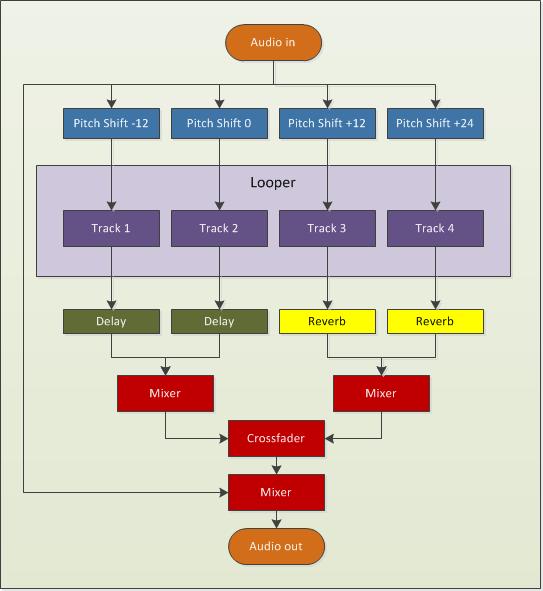
This is the audio flow I came up with:
V set flow
Incoming audio is sent to outputs and also split to four tracks on a multitrack looper.  Before reaching the looper, each signal path goes through a pitch shifting effect.  Each track then goes to its own post-looper effect.  Tracks 1 and 2 go to a delay while Tracks 3 and 4 go to a reverb.  Those two groups of tracks are mixed together and the result is sent to a crossfader than selects between these two sources.  The output of the crossfader is mixed with the audio input and sent out.  
My looper is Mobius.  I could’ve used another looper for this project, but my familiarity with this software and ease of implementation won out over wanting to play with another looper (I’ve had my eye on Augustus for a while).
My pitch shifter is Pitchwheel.   It’s a pretty interesting plugin that can be used on its own to create some interest in otherwise static loops.  Here, I’m only using it to shift the incoming audio, so it’s a pretty straightforward scenario.
My reverb is Eos by Audio Damage.  Do you know of a better sounding reverb that is also CPU friendly?  I can’t think of any.  My delay in this project is also by Audio Damage.  I’m using their Discord3 effect that combines a nice delay with some pitch shifting and filtering with an LFO thrown in to modulate everything.  This effect can really make things sound weird, but I’ll be using more subtle patches for this project.
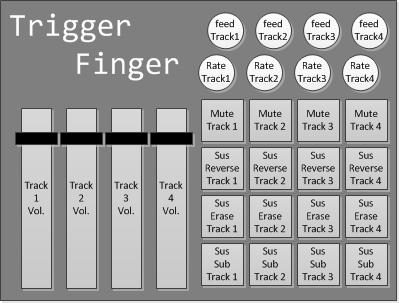
To control all of this, I’ll be using my trusty Trigger Finger to control the looper and my Novation Nocturn to control the effects.  Here’s what I decided to do for looper control:
V set control
Starting on the left, the faders will control the volume of my tracks in Mobius.  The pads and rotary dials on the right are grouped by column and correspond to tracks 1 to 4.  Each button perform the same function, but on different tracks.  The bottom row of pads call the sustain substitute function on a given track.  The row immediately above it does the same thing, but will also turn off the incoming audio, so it will act like my erase button (with secondary feedback determining how much the sounds will be attenuated).  The next row up sends the track playing backwards for as long as the button is pressed and the final row of buttons mutes a given track.  The first rotary dial controls the playback rate of a given tracks and the top one controls its secondary feedback setting.
To control the effects, this is the mapping I came up with for the Nocturn:
V set effect control
The crossfader is obviously used to control the crossfader between the two track groups.  After that, each track has two knobs: one that controls the amount of pitch shift to audio coming in to the track and another that controls the wet/dry parameters of the tracks post-looper effect.  The pads on the bottom will select different plugin patches, but the last one on the right is used to reset everything and prepare for performance.  Among other things, it will create an empty loop of a specified length in Mobius, which is needed before I can begin using the sustain substitute function.  Essentially, I’ll be replacing the silence of the original loop with the incoming audio.
One thing I won’t be doing is tweaking knobs and controlling every single parameter of my plugins.  I’ll rely on a few well-chosen and specifically created patches instead.  Also, keeping the effects parameters static can be an interesting performance strategy.  When I heard Mia Zabelka perform on violin and body sounds last year at the FIMAV, one thing that struck me was that she played her entire set through a delay effect without once modifying any of its parameters.  The same delay time and the same feedback throughout.  For me, this created a sense of a world in which her sounds existed or a canvas on which her work lived.  It’s like she changed a part of the physical reality of the world and it made it easier to be involved in her performance because I could predict what would happen.  Just as I can instinctively predict the movement of a bouncing ball in my everyday universe, I became able to predict the movements of sound within the universe she created for us with her performance.
Here's a recording I made tonight by fooling around with this setup:

Tuesday, May 29, 2012

New Album Release: sans jamais ni demain

I’ve just released a new album on Bandcamp: sans jamais ni demain. It’s a collection of experimental electronic music and recent explorations. Nothing grandiose, but I felt the need to update my bandcamp and share what I’ve been working on. A little more details about the songs:

the longing for repetition


“Happiness is the longing for repetition.”
---Milan Kundera
This is a song I made for CT-One Minute. All sounds are derived from a 10-second bass clarinet phrase sample that can be downloaded freely from the Philharmonia Orchestra's website. The sample was played back at various playback rates, forward and backward, through various envelopes using the Samplewiz sampler on my iPod. This performance was recorded in one take with all looping and effects done in samplewiz. No further editing or effects except for copy and pasting the beginning at the end to bring closure to the piece.
I approached samplewiz as a livelooper, since, in "note hold" mode, every note on the keyboard can be seen as a track on a multi-track looper (each with a different playback rate). For this piece, I used the forward and backwards loop settings in the wave window, so things get go sound a bit different. I added some delay and messed with the envelope and it started to sound nice. Once I had a good bed of asynchronous loops, I left "note hold" by tapping rather than swiping the control box (this kept the held notes). I then changed the settings around and played over the loops without "overdubbing".
Samplewiz is quite powerful... You can also change the loop start and end points in between notes to add variety, without affecting the notes that are already being held.

tutus de chemin


This is the soundtrack for a short film I made in a weekend with my wife. I started with a vocal recording of my wife that I sent through Paul's Extreme Sound Stretch. The resulting audio file was played back as a looop in Bidule. I sent the audio to a pitch shifting plug-in (I believe I was using PitchWheel at the time) and then to a midi gate group and finally to the Mobius looper. I performed the sounds two-handed on my Trigger Finger. One hand was controlling a fader that was assigned to pitch shifting and the other was triggering pads to control the midi gate (the note envelope) and various functions in Mobius.

Three of a kind


This piece started out as an assignment for a course in Electroacoustic composition I took at SFU a few years ago.  The sound source was a homemade instrument, but everything was mangled and cut-up.  This piece features heavy use of the short loop fabrication technique familiar to readers of this blog.  I used Acid to assemble everything and add some effect automation throughout the piece.

le train


This is the soundtrack to a short animation film I made last year.  I used Soundgrain to isolate parts of the original sound's spectrum and used that software to create loops that I mixed  while recording.  I think this musical cutup is well-matched with the visual cutup it was meant to accompany.

Game music


This songs was made using my soon to be released iOS app: BreakOSC!  This app is a game that sends OSC messages based on in-game events.  In this case, when the ball hit blue and green bricks, Bidule triggered four instances of iZotope's Iris.  The paddle served as a cross-fader and mixed all those sounds together.  The results were sent to a generous amount of reverb courtesy of Audio Damage's Eos.

sans jamais ni demain


Another composition I made for the aforementionned course in electroacoustic composiiton I took at SFU.  The only sound source for this piece is a recording of myself reading an old poem I wrote in high-school.  The slow moving textures were made by isolating parts of those words, slowing them down and layering them over each other to create very long notes of varying pitch that fade in and out over time.  The more rythmic stuff I made using a now familiar technique.

July 8 2011


This piece is a recording of a live (from my basement) performance of what will one day become my meta-trombone.  A short loop is created at the top (what is heard twice in the beginning) and then altered in different ways determined by trombone performance.

Twice through the looking glass


This song was also made for CT-One Minute using the exact same sound source as the longing of repetition. This time, however, I used Iris to change the character of the sound and created two different sound patches.  I made two recordings with each of these patches by triggering the sounds with my new Pulse controller.  My three-month old daughter also took part by adding her own surface hitting contributions, making this our first father-daugther collaboration.  Once I had made these two recordings, I brought them in Bidule and placed them into Audio file players.  The amplitude of output of each player was controlled via faders on my Trigger Finger and the result was recorded to file.

Thursday, December 16, 2010

Guitar controller part IV

Yet another instalment in my guitar controller saga…  technically, this project is done.  Everything works as it should, however there’s still some cosmetic work left to be done.  You’ll notice it is still unpainted and the top part of the controller’s body is held in place with an elastic band… not optimal.

But it does work and here’s proof:

Jamming on the guitar controller

This controller is nothing by itself but a bunch of buttons.  It only sends out MIDI notes and to achieve anything beyond that requires some programming.  For this, I once again turned to Plogue’s Bidule. 

In the patch I made, the neck buttons were divided into three groups that randomly select audio files for playback from three different pools: subjects, verbs and complements as spoken by my wife.  That gives four buttons per grammatical groups and I decided to exploit that by assigning a different playback speed to each of these buttons.

The three central buttons on the guitar controller’s body trigger playback of the selected sound file.  Pressing a neck button by itself only selects an audio file and does not produce a sound until one of the trigger buttons is pressed.  The first two trigger playback from the beginning of the file and the third button triggers in reverse from the end.  One thing I’d like to try is setting one of the first two buttons to pick a random start position…  it might introduce some interesting possibilities.

This is how I implemented the guitar analogy for this patch.  Pressing neck buttons is analogous to fretting a string (select audio file), while pressing trigger buttons is akin to picking notes.  Together, these two actions produce a given sound.

The sounds are fed to the Mobius looper, which I control with my feet through my Trigger Finger.

Saturday, July 24, 2010

Building an instrument

An approach to electro-acoustic music that fascinates me is to create an instrument from scratch to generate new sounds. I see this as continuation of the exploration into sound that motivated Varèse to compose for percussion ensembles and that lead John Cage to compose for prepared piano. Through the works of these composers, music becomes less about the pleasing presentation of notes and more about the aesthetics possibilities of sound itself.

Diego Stocco

Diego Stocco is a more current inspiration for my adventure into instrument building. His bassoforte (video below) is a particularly effective demonstration of the possibilities available to the composer who creates his own instrument. Through careful design, Stocco is able to produce a myriad of sounds that retain a similar character and give the composition a sense of unity, in part because they all come from the same instrument.
Of course, this is a hybrid instrument. Stocco has placed several microphones of different types around and on his instrument. The signals from these microphones are mixed and processed by his nearby laptop to produce the actual sounds of the instrument. Combining different microphone types and placement with different processing gives him plenty of options to choose from to design his sounds. His approach is perhaps better understood by watching his music from a tree performance.

Instrument #1

My first attempt at instrument building is rather modest in comparison, but that reflects not so much my means as my aims. Unlike Stocco, I don’t intend to record a song by performing all its parts one after the other. Rather, I’ll record several sessions where I coax out as many varied sounds as possible from my instrument. These recordings will become the sound source for musique concrète manipulations and other processing to produce an electro-acoustic composition.
whole
The design is fairly simple. I made a resonator box from scrap wood and inserted some nails at each end. I wrapped two types of metal wires around those nails to create strings. A movable bridge adjusts the pitch of the strings. I’ve installed a homemade contact microphone to the soundboard to capture the various sounds of this instrument.
side-nails

Sounds

Sounds can be made by hitting any wooden surface, the strings or the nails. I can strum or rub the strings with my fingers or with objects. I can also use a piece of wood to “bow” the open end of the box to produce a complex (and aggressive) sound. I can also buzz my lips into a small hole at the other end of the instrument (as a jug player would do) to produce a sound that has a certain brass instrument quality to it.

Here are some examples of these sounds:


Next steps

Over the next couple weeks, I’ll be recording more sounds and editing and processing them into a composition.

Friday, July 16, 2010

Musique concrète with Bidule and Mobius

For a recent composition, I wanted to create a short rhythmic loop by combining small fragments of a sound event I recorded. This project was inspired by the works of early musique concrète composers who would edit their tape recordings into unrecognizable rhythms and gestures.
Editing sounds has since moved beyond the necessity of cutting and splicing tape, but the tedium of using a sound editor to cut and paste short sound fragments can yield results that lack the spontaneity of a musical performance. I would rather perform my loop, cutting and pasting sounds and creating my rhythm on the fly. My vision was to reduce the cutting and pasting to a single key press that would incorporate the selected sound automatically into the loop, while both the sound source and the resulting loop played back in real time.

Software

To do this I needed some specialized tools. The first was a looper that would allow me to grab short even portions of incoming audio. I also needed a way to monitor both the loop and the sound source and to record my results. I found I could accomplish all of this by using Mobius and Bidule.
Mobius is a free software looper (stand alone and plug-in) developed by Jeff Larson as an emulation of Gibson’s Echoplex Digital Pro, but it has since taken a life of its own. It is free and its user community is welcoming and immensely resourceful.
Plogue’s Bidule is a modular audio environment like no other. It allows the user to create complex patches between bidules; little boxes in the software’s interface that stand in for VST effects, VST instruments, file players or recorders, Rewire applications, midi and audio devices, oscillators, filters and pretty much anything else that a computer musician might need. Bidule is demoware and costs 95$ (CAD). However, the trial licence lasts for a couple of months, so you’ll have plenty of time to try it out and to appreciate its usefulness.

Setting up

The first thing I did was to setup a patch in Bidule containing an audio device (my antiquated UA-100), an audio file player, a file recorder, a Trigger Finger midi interface and Mobius. I loaded my source sound into the file player and looped its playback.
I patched the output of the file player to the left channel of my UA-100’s audio out and to the audio input of Mobius. I also patched the midi out of the Trigger Finger to the midi input of Mobius. Then, I patched the output of Mobius into the file recorder and the right channel of the UA-100’s audio out. This way, wearing headphones, I heard the sound source in my left ear and my rhythmic loop in my right ear.
bidule
Next, I assigned some of Mobius’ commands to the Trigger Finger’s pads. For this session, I only used Record, SUS Substitute and Undo. I also assigned Secondary Feedback to a slider control on the Trigger Finger. Here’s what those commands do:
Record
Press once to start the loop and another time to end recording.
SUS Substitute
This command substitutes a part of the loop with incoming audio for as long as the key is pressed.
Undo
This cancels the last action.
Secondary Feedback
When Substitute is used, Mobius records over a portion of the loop. If secondary feedback is set to 127, the audio from that portion of the loop will remain at the same volume. If secondary feedback is set to 0, it will completely disappear from the loop. Anything else will mix the sounds accordingly.
Next I had to tweak a few of Mobius’ parameters. Mobius is quite complex and I only scratch the surface of its capabilities with this experiment. One of the settings I had to change was the 8ths per Cycle. In Mobius-speak, an 8ths is the number of divisions the software will make in the recorded loop. Let says I record a 1 second loop and the 8ths is the set to 10. In this case, Mobius will create cue points for the loop at every 0.10 second. If the quantize setting is set to Subcycle, then some of Mobius’ commands (such as SUS Substitute) will only begin and end on those cue points yielding instant rhythmic madness.
mobius

Playing the loop

I monitored the source sound playing continuously in the file player through the left channel of my headphones. I started by pressing Record once to start recording the loop, ending it with another press of Record. I automatically heard the result in the right channel of my headphones. I had two asynchronous loops going and I started substituting small parts of that newly created loop using SUS Substitute to insert elements of the source sound. All substitutions began and ended on a cue point (8ths) and lasted for as long as I pressed the command’s pad. I experimented with using various levels of Secondary Feedback to retain, at lower amplitude, the sounds over which the substitution took place, using the occasional Undo to reverse an unwanted change.

The results

This is the sound source I recorded. It’s a ten second performance of fingers rubbing on a plastic shower wall.


Here are examples of loops that were created with this method:


Here is a loop that I created using the same method, but with the original sound source replaced by the first loop above. A bit of a remix…

Thoughts for further experimentation

The obvious next step would be to introduce some complexity to the Bidule patch. For instance, I could send the output of the file player to several effects (filters or pitch shifters and so on) instead of sending it straight to Mobius. The output of these individual effects could be sent to a mixer before reaching Mobius’ input. The faders on that mixer could be assigned to an external controller to select how much (if any) of the effected versions of the sound source make it to the looper. I could play those faders with my hands while triggering the Substitute function with a foot pedal. I would also like to try changing the 8ths value while the loop is playing. If this is possible, it would greatly increase the rhythmic diversity of the loop and introduce some polyrhythmic opportunities.