Showing posts with label computer music. Show all posts

Wednesday, January 23, 2019

Updated Meta-trombone pedalboard now in stereo

I haven't looked back since moving my meta-trombone from the Macbook Pro to the pedalboard in 2014. Playing with hardware has lead me to create musical devices of my own (which I consider to be a fun hobby and a great distraction) and has benefited my music-making. For instance, here are some videos: the first from a performance in Providence in 2016 and the second of a piano jam at home.


While I enjoyed playing with this setup, there is one compromise I found increasingly hard to accept: the lack of stereo separation. I therefore took it upon myself to redesign my board to remake the meta-trombone once again in stereo. To do so, some pedals were added and others removed. The most surprising change might be the replacement of the Inifinity looper with a second Ditto. The most inspiring (and costly) may be the addition of the three Meris pedals. A lot of changes were also done under the hood in the Pure Data patch and may need to be explored in another post. Overall, this new iteration of the meta-trombone gives me even more flexibility to create music that can be either very rhythmic or atmospheric and drone-like. 

As you might expect if you've been following along for a while, the signal path is complicated. I made a graphical representation to better communicate it (description follows).

Signal path is complex, but colour-coded: green is MIDI, red is control voltage and the other colours represents different audio signal paths.

Audio signal path

The audio path starts with the YSL-697Z Professional Trombone into my trusty Audio-Technica cardioid condenser clip-on microphone. I have been using this microphone for a while and I have never felt the need to look elsewhere in over a hundred gigs. The mic is plugged directly into the Apogee Duet, which provides it with the required phantom power and pre-amplification. The Duet has two inputs and four outputs and I use all but one of the inputs. The Duet provides the interface to my Pure Data patches running on an iPhone 5 through an app with the unlikely name of MobMuPlat.

Once processed in Pure Data, the audio takes three different paths:

First, a stereo signal is sent to the Meris Ottobit Jr. Its outputs are sent to a pair of mono TC Electronic Ditto loopers modified to accept 5v control voltage in lieu of footswitch presses (more on this here). The outputs of the two Ditto loopers are sent to two audio summers (left and right).

Second, the left channel is sent through the Moog Minifooger Ring to the Montreal Assembly Count to 5 and then to a EHX Freeze and the Meris Polymoon. The Polymoon’s outputs are sent to two audio summers (left and right)

Third, the right channel is sent to the EHX Superego and Pitch Fork. The signal then goes to the Abattoir (one of my original creations) and the Moog Minifooger Drive before reaching the Meris Mercury7 reverb. The Mercury7`s outputs are also sent to two audio summers (left and right).

The outputs of the two audio summers are sent through a Radial ProD2 to a pair of ZLX-12P powered speakers. To round out the audio path, the Organelle’s outputs are also sent to the two ZLX-12P through a second ProD2. The Organelle provides percussion by running a Pure Data patch that includes my external based on the code for Mutable Instruments' Grids module.

MIDI signal path

The MIDI signal path starts with two controllers, the KMI 12 Step and the original Trigger Finger from M-Audio, that are sent to the Apogee Duet through a MIDI Solutions Merger and a Roland UM-ONE MIDI USB interface. Trombone notes are also converted to MIDI signals on the iPhone 5 by using the MIDImorphosis app. Most of this MIDI data is consumed in my Pure Data patch, but some is filtered and sent out to control parameters on other devices. After the MIDI out, the first in the chain is the TEMPODE which merges tap-generated MIDI clock to the control information it receives. Next in the chain, we have a MIDI Solutions Quadra Thru that buffers the signal and splits it to the Organelle, through a second UM-ONE, and to two DIY MIDI modules: a DIY MIDIBox and my Ditto loopers controller. MIDI signals are routed from the DIY MIDIBox to all three Meris pedals.

Control voltage signal path

There are two distinct control voltage (CV) signal path. The first starts with the Patterner, my original creation that replaces an expression pedal anywhere you would normally use one. The Patterner's output is sent to the expression pedal input of the Copilot FX Bandwitdh, which outputs three 0-5v CV signals based on its expression pedal input. These three outputs are used to modulate the Pitch Fork and the Ring I'm considering routing the third CV output to the Count to 5 as I've learned that it can accept control voltage in the 0-3v range.

The second CV path is generated from my DIY Ditto controller that sends out 5v gates to trigger the looper's "footswitch" functions based on incoming MIDI control signals.

In performance

Last year I was invited to submit a track for Trombilation, a compilation of solo performances by some adventurous trombonists. My contribution, Cicada river chorus, documents one of the first performances with this setup.

Monday, October 13, 2014

Meta-trombone on iOS

When I was invited to perform at IMOOfest 2014 as part of the IMOO Chamber Orchestra (featuring Jean Derome and Joane Hétu), festival organizer Craig Pedersen asked me to keep my electronic setup as simple as possible.

There were two considerations that guided the redesign of my meta-trombone. First, I wanted a lighter rig that could be quickly deployed on stage. Second, I had to make changes to adapt from solo performance to ensemble playing.

Lighter is better

I’ve already given details on all the hardware and software that I have been using to date to create the meta-trombone. If there is one problem with this rig, it is the weight of my Gator case (laptop + 2U), While I certainly like its sturdy construction, hauling it through the Paris subway last summer made me question its necessity. It certainly annuls one of the advantages of making music with a computer: not having to carry heavy gear all over the place.

The model I chose to adopt was that of the guitar player: I wanted my rig to consist of a small pedalboard, my instrument and an amplifier. I think this meets IMOOfest’s simplicity requirement as I know other performers will have a similar setup. It will also allow me to play in venues that don’t have their own PA, such as art galleries and house concerts.

Starting with the end of the signal chain, I began to research amplifiers, I quickly excluded guitar amps, since they’re an extension of the electric guitar and add too much tone coloration to the signal to be of any use to me. I briefly considered buying a keyboard amplifier, but ultimately I decided to buy an Electro Voice ZLX powered loudspeaker. The ZLX is inexpensive, sounds decent and is quite versatile. It can output up to 126db, which can easily match the acoustic sound of the trombone. I bought a single speaker for the IMOO gig, but I think I’ll get a second one for solo work to abuse the stereo field.

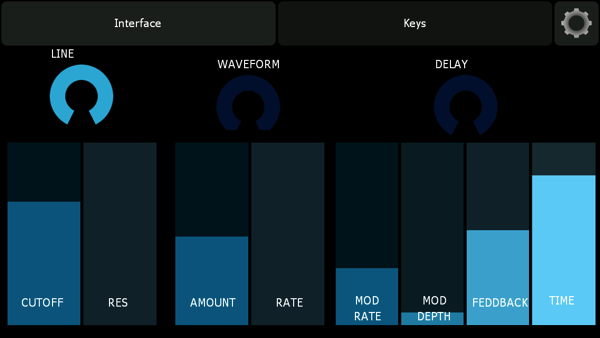
Moving to the pedalboard, I decided to port my Bidule patch to Pure Data so that I could run it on my spare iPhone 5. I’ve been playing with libpd since it was rolled out, but instead of coding my own iOS application, I went for the simplicity and ease of use that MobMuPlat offers. I quickly created an interface in the MobMuPlat editor and I had a Pure Data patch running on my iPhone in no time (look below for further details on the patch).

The biggest hurdle to making music with the iPhone is that you need to get audio and MIDI through the iPhone’s unique connector. Apogee’s Duet provides an elegant solution as it offers an audio interface (2 inputs / 4 outputs) with a USB MIDI connector. I connected my KMI 12 Step to it without any issue. I’m also using a Yamaha FC-7 expression pedal that connects to the 12 Step expression port. Audio input is through my trusty Audio-Technica ATM350 Cardioid Condenser Clip-On Microphone. All the gear fits on a Pedaltrain 2, which came with a nice carry bag.

Photo

(notice extra room for future iPad expansion or stomp boxes)

Working with iOS

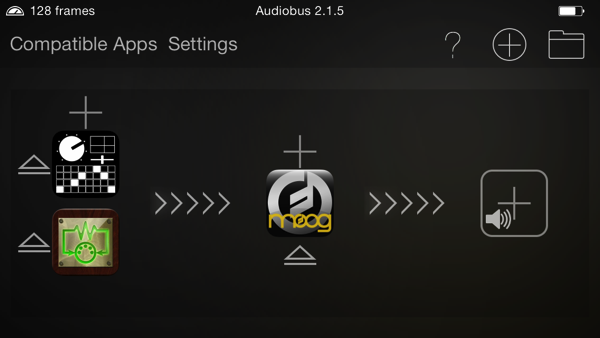
Aside from the previously mentioned MobMuPlat, I’m making use of several other apps as well.  First, for pitch to midi conversion, I’m using MIDImorphosis.  There are other apps that provide this functionality on iOS, however this is the only one that has Audiobus support and that made the difference in the end, since it’s the only I’ve found of splitting a audio channel to two different apps. I’m also using Audiobus to route the output of MobMuPlat to Moog’s Filtatron.  Filtatron is a great sounding app that combines an analogue-modelled filter with modulation, a warm distortion and a delay with feedback and modulation.  There’s also an oscillator and a sample player/looper but I haven’t needed those yet.

Below is what the routing looks like in Audiobus:

Photo 1  1

This is the interface to my Pure Data patch in MobMuplat:

Photo 4

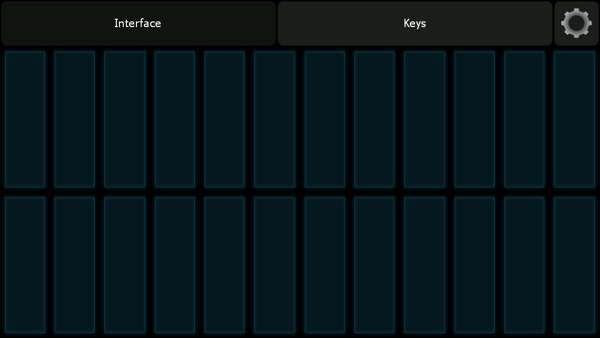
I have a second iPhone 5 strapped to my trombone that can send MIDI control signals over bluetooth (using the excellent Apollo MIDI over Bluetooth app from secret base design).  I created the following interface in Lemur to control Filtatron and send midi notes to my Pure Data patch:

Photo 2  1

Photo 3

The patch I create in Pure Data is essentially a looping sampler.  Once a phrase is recorded, it can be played back a different rates. When the LOOP toggle is on, the notes sent to the sampler will be held and the sample will loop at the playback rate that corresponds to the given note.  Up to four notes can be held at one time (with voice stealing). 

Additionally, the trombone performance can be analyzed with MIDImorphosis to convert the audio to MIDI notes. These notes can be used with the sampler in one of two modes.  The first is the “Sampler” mode in which the playback rate is fixed at a value determined by an adjustable pitch shift value. The MIDI notes triggered by the trombone will select the starting position within the sample in such a way that a given pitch class will always trigger playback from one of twelve divisions within the sample. The “Synth” mode will trigger playback from the beginning of the sample at a playback rate corresponding to the actual note played on trombone.

Future development

This setup served me well in performance and I’m not looking back. I believe that all future development of the meta-trombone will take on this platform. The next logical step would be to add a looper to this setup. I already have a nice hardware looper I could throw in, but I’ve had a lot of fun playing with a Pd patch created by  Marco Baumgartner called ALFALOOP, which is a well designed delay-based looper that has all the features I need to build from.

Friday, February 7, 2014

OSCNotation 3.0

Version 3.0 of OSCNotation has just been released on the Apple App Store.

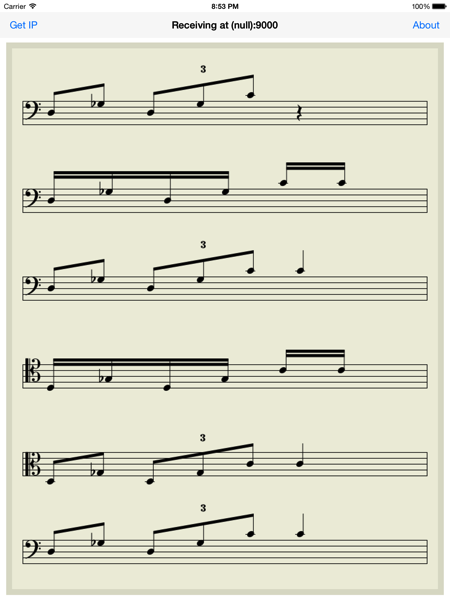
I started working on this update in December when composer Nicolas Fells contacted me about including iPad support to OSCNotation for a piece he was working on. The appeal of working with the iPad is that OSCNotation can be used to display multiple staves on the same screen.  Musicians can all read from the same device and see how their parts interact with those of their colleagues. This is probably the single most requested feature and I had some spare time I decided to dedicate to this task.

IOS Simulator Screen shot Feb 4 2014 8 53 03 PM

The user guide has been updated to reflect all changes.

What I find most rewarding about my work in music technology is hearing the music to which my software contributes. Below is a concert from early 2013 featuring Dan Tepfer and Lee Konitz.  Dan is using OSCNotation to send musical notation to the Harlem String Quartet from his midi keyboard. How cool is that?

Tuesday, February 4, 2014

My Commodore 64

Lately, I've been obsessed with the Commodore 64.  It all started when I read a fantastic little book that discussed a one line program from a variety of different angles.  After spending a couple hours with emulators running on my MacBook, I wanted to get my hands on the real thing.

My first computer was a Commodore 64.  I remember vividly the happiness I felt that night in December when my father came home with all those boxes.  He laid everything on the floor and we spent hours putting everything together.  All the manuals and documentation were in English and at that age (eight), I had yet to master the language.  This is probably the greatest gift I ever received from anyone.  Not only was the Commodore 64 a fun game system, it was my first introduction to computer programming.  I spent a lot of time deciphering the codes in the manuals and I made little games in BASIC.  Unfortunately, I never figured out how to save anything, so I had to input the code every time I wanted to play one of my games (again, the manuals were in a "foreign" language).

All this reminiscence eventually lead me to acquire two systems.  The first is an early model breadbin C64, just like the one I had as a kid.  I made some modifications to it:
  • I added an SD card reader to replace the bulky disk drive; 
  • I added some buttons to control the SD card reader; 
  • I installed JiffyDOS with a Kernel selector switch;
  • and I installed heat-sinks on most integrated circuits.  
I will use this unit to play games and to create my own programs.

Programming the C64 may seem like an odd idea (or a waste of time), but the 6502 CPU on which the C64's CPU is based is still being manufactured and seeing lots of use in certain applications.  Learning program in 6502 machine language may be a very worthwhile endeavour…  these chips are a lot cheaper then the micro-controller development boards available these days and, in some sense, a lot more powerful.

Also, the Commodore Basic language was ported to OS X, Windows and Linux as a powerful scripting language.  As such, it is an interesting alternative to other scripting languages and a nice way of recycling my old chops.

I also acquired a mint condition C64G.  This is a beautiful unit with a C64C motherboard in a creamy-white breadbin case.  I got this one specifically for musical purposes and I modified it in the following way:
  • I added a 1/4" audio output; 
  • I grounded the audio input to reduce noise; 
  • I installed an LCD screen;
  • I installed a power plug for the LCD screen;
  • I installed heat-sinks on most integrated circuits.
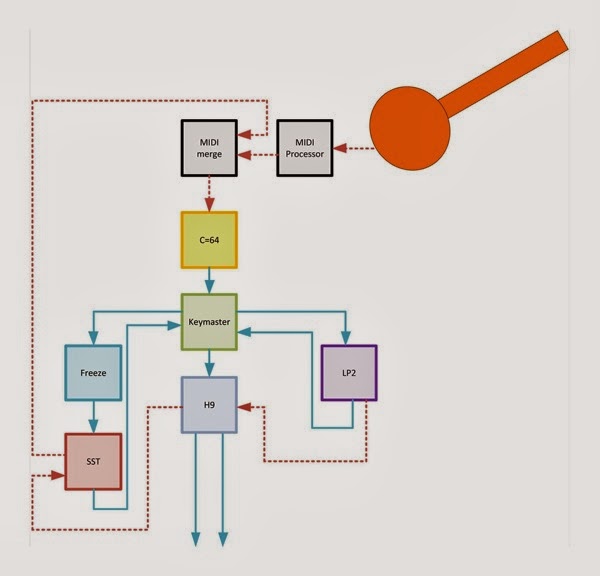
This C64 will live on a pedal board next various guitar pedals. I'll use MSSIAH's mono-synth program as a sound source to be modified by the guitar pedals.  For controller, I'll use my previously mentioned homemade midi guitar controller.  I'm also using a Raspberry Pi running Pure Data to process the midi signals from the guitar controller to the C64.  Here's the signal path I'm considering at this time:

1266867 575796905816004 674561434 o

Friday, July 26, 2013

Meta-trombone: European tour edition

Leading up to my currently ongoing European tour (concerts in Paris and Cologne); I  tweaked my meta-trombone yet again.


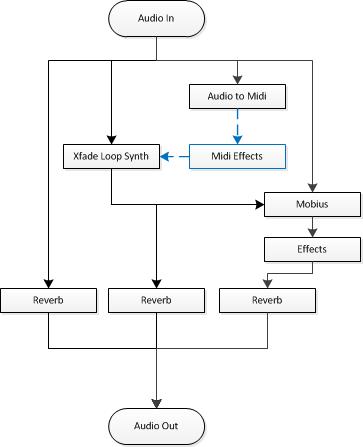
The trombone audio input goes to:
The audio to midi converter interprets the trombone performance and outputs midi notes.  Those notes are either sent to the Midi Looper (more on this below) or to the sampler.  Before reaching the sampler, some midi effects can be applied to the midi notes (Midi Delay and Cthulhu).  The output of the sampler goes to the audio outputs (with reverb) and the looper.

The KMI 12-Step controls either the Midi Looper or the Mobius Looper.  As commands are sent, the Head’s Up Display on my iPod Touch is updated (see image below).  I use the Line 6 FBV to change Mobius’ output volume, secondary feedback and playback rate.  I also use it to change the quantization setting of commands being sent to Mobius from the 12-Step.  As I change these parameters, the Head’s Up Display on the iPod is updated (four dials in upper left corner).  I select which parameter the pedal affects using the four switches on the FBV.  When a parameter is selected, its dial appears green on the iPod.  In this way, I can modify several parameters at the same time.


Finally, the output of the looper goes to audio outputs through reverb.  I have eliminated the post-looper effects, as they were more confusing than aesthetically satisfying.

Performance modes

The signal flow is only part of the story; to understand what is going on in a meta-trombone performance, I need to discuss the various performance modes.

Trombone Mode

In this mode, the acoustic trombone sound is being sent to the looper and will be recorded.  Turning off this mode, the trombone sound is no longer sent to the looper and will not be recorded, but it is still sent to the audio outputs.

Midi-note Mode

In this mode, the midi notes interpreted from the trombone performance are sent to the sampler.  This mode is only relevant once a phrase has been recorded into the sampler during performance.  There are two sub modes: synth and trigger.  Synth will cause the sampler to playback the recorded phrase from where playback last stopped at a playback rate relative to the note being played (e.g. higher notes cause faster playback).  Trigger will cause the sampler to playback at a defined playback rate starting from one of sixteen positions within the phrase relative to the note being played.  The playback rate of the trigger mode can be modified during performance.

Midi Loop Mode

In this mode, the midi notes interpreted from the trombone performance are not sent to the sampler. Instead, they are sent directly to the Mobius looper and the Midi Looper.  Any given note will select a loop (1 through 4) and a starting position within that loop.  In this mode, I can “remix” all my loops together by playing trombone!

The midi looper can record those loops and since the output is sent to the looper, the “remix” I created in performance keeps going when I change mode or stop playing the phrase that gave it life.
I developed the Midi Looper in Cycling 74’s Max/MSP and the software is currently available for OS X (Windows support in the near future).

Monday, April 22, 2013

Tools of the Trade – Meta-trombone Edition

After every show, someone always wants to get more information about the technology that makes my meta-trombone possible. For the benefit of those who cannot make it out to one of my concerts, I thought I would briefly list and describe the hardware and software I rely on at this stage of the instrument’s development.

Hardware


Mac Book Pro (mid-2010 i7)

The central nervous system of my rig, my MBP is indispensable. These days you can use any manufacturer’s computer and almost any operating system to create music in real-time; however, there are advantages to using a Mac. Foremost is availability of replacement computers that precisely match the specs of my current machine. In addition, third-party developers can test their hardware and software on exactly the same system as the one you are using, which may not be the case with other computers. The result is better system integration that results in less setup time and more music making.

Apple iPod Touch (4G)

I use the iPod touch (attached to my trombone) as a heads-up display for system information and looper status. This way I don`t need to look down at my laptop too much. I can also use the iPod`s accelerometers to control parameters.

RME Fireface 800

RME are makers of audio interface of choice for anyone interested in reliability and sound quality. The FF800 features lots of ins and outs, direct monitoring and a matrix mixer with presets. This is more than I need, which is precisely what you want from your audio interface… your tools should not hinder your creativity.

ATM350 Cardioid Condenser Clip-On Microphone

I have been using this microphone for years… over a hundred gigs and I have never felt the need to look elsewhere.

KMI 12 STEP

The 12 Step is a great little controller with a piano keyboard layout and illuminated keys. It is small enough to fit in a 1U rack drawer, its USB powered, it is solid and it is spill proof. What else do you need?

FBV EXPRESS MkII

I am still integrating the FBV into my set, but the four switches allow me to select what parameter the expression pedal affects. I think this will prove very useful as I continue development on the meta-trombone.

Gator GRC-Studio-2-Go ATA Case

I like this case because I can arrive at the gig with everything wired and ready to go. I added a 1U drawer to keep my microphone and my KMI 12 Step, so this single box contains almost everything I need for the gig.

YSL-697Z Professional Trombone

The 697z has been my horn of choice for the last five years. Yamaha built it for Al Kay, but it meets all of my expectations of what a great trombone should be.

K&M 15270 Trombone Stand (in-bell)

Since, you should never leave your trombone on the floor; always bring a stand with you. The convenience of the in-bell stand outweighs the inconvenience of an unbalanced trombone case.

Yamaha Trombone Lyre

After many false starts, it turns out the best way to attached anything to your trombone (iPod Touch, sensors or whatever) is with a lyre.

Sennheiser HD25-1 II Headphones

Since I could never get used to playing a brass instrument with something stuck inside my ears, I only use over the ear headphones to monitor the mayhem on stage. The HD25-1 II provides a good level of noise isolation and gives me a great signal.

Software


TouchOSC

I run TouchOSC on my iPod Touch to display system status information received wirelessly from my MacBook through OSC messages. I also use it to send the iPod’s accelerometer data to the MacBook. The long-term goal is to write my own performance software for iOS that will also display algorithmically generated musical notation.

Circular Labs’ Mobius

The Mobius looper is developed by Jeff Larson, who makes it available freely. A scriptable multitrack looper, Mobius brings a lot of creative potential to the table. I cannot imagine how hard it would be to make music without this tool, as I am unaware of anything quite like it.

Expert Sleepers’ Crossfade Loop Synth

While it is primarily a sampler, you can also view this versatile plugin as a creative delay or even a looper. I have a series of tips and tricks for this plugin that I will post shortly.

Audio Damage Eos

Eos is a good sounding reverb that does not tax your CPU too much.

Xfer records' Cthulhu

This nice little plugin consists of two independently selectable midi effects: a chord memorizer and an arpeggiator. The chord module allows me to assign a user-defined chord to any midi note. The arpeggiator takes the output of the chord module and sequences the chord notes according to a pre-defined pattern. Sending the output of Cthulhu to the Crossfade Loop Synth adds a lot of interesting possibilities.

Plogue Bidule

This is where the magic happens. Bidule is a graphical music programming environment. It is also a VST/AU host, so you can use your plugins as elements within your “code”. I use it to convert my trombone sound into MIDI notes and to route signals between plugins based on system state. I also use it to augment the functionality of the plugins I use. In a way, the Bidule patch is the instrument and the composition when I play meta-trombone.

Future Addition


GameTrak controller

The GameTrak controller is an intriguing option for gestural control of musical parameters. After reading on the development of the 3D Trombone, I ordered two GameTraks and I think I will incorporate them into my performance system. By determining the distance between the two hand units while playing trombone, I think I can use this controller to determine the slide position. There are other possibilities, of course.

Max

I`ve been learning Max since last summer and I can think of a few ways it will prove useful down the road. Presently, I really appreciate how easy it was to integrate with the Arduino to read the values coming from the GameTrak controller or other sensors. I`ve also been playing with GEN and the sounds I get from it are very surprising. There are also a number of interactive music patches available for Max that makes it worthwhile to study this software.

Thursday, March 14, 2013

The virtue of free

Last year I released two apps for iOS: BreakOSC! and OSCNotation. Both used Open Sound Control (OSC) to accomplish very different things.
In BreakOSC!, the user plays a game of Breakout to change parameters in their music software based on what occurs in the game. I thought this was a great idea… I spent a couple months polishing this app and tried selling it for 0.99$. Twelve people bought it. No one reviewed it and I received no emails from its users. The only reason I do not consider this project a complete waste of time is that I make use of the app in my own music, from time to time. I do not plan to do any further work on this app.  (I have since made it available for free and over 200 people have downloaded it in only a few days)
OSCNotation has been a very different story. For my main ongoing musical project, I needed to display programmatically generated musical notation on the iPhone. Once I found a way, I realized that other musicians and composers could also find uses for this and I packaged this part of my project into a simple app that displays notation based on messages it receives via OSC. It took me very little time to create this app and I did not polish it to the level of BreakOSC!. Consequently, I made it available for free.
The response has been amazing. CDM reviewed it and Music Tech Magazine spread the news to its readers. To date, over 500 people have installed OSCNotation. Furthermore, users also contributed back… Carl Testa created a tutorial for Supercollider and Joel Matthys created ChucK code for a performance of Riley’s “In C”. Joel also coded an Android version of OSCNotation that mirrors the features of the first version of my app.
I have also received many emails from users describing their intended use of my app to teach, compose and perform. I look forward to hearing the music they create with my app.
Further, this interest in OSCNotation brought some attention to my own music and art. Indeed, my blog and bandcamp stats show a spike surrounding the dates of the original release.
Given all this, it is not very surprising that I felt it worthwhile to continue the development of this app. Today, I am very happy to announce the availability of OSCNotation version 2.0!
Some of the new features:
  • Note beaming
  • Triplets (half note, quarter note and eight note)
  • User can choose to display accidentals as flats or sharps
  • User can specify beat duration (affects note beaming). 
You can refer to the user guide page on the OSCNotation website to see how that works. Enjoy (and please share your music).

Thursday, January 31, 2013

Where I propose to go


These last few months since Y2KX+2 have seen much development on my meta-trombone.  The first thing I wanted to do after those performances was to replace the first instance of Mobius in my signal chain.  I think the way I was using it (as a sampler, rather than a looper) caused it to crash in performance.  After some research, I opted for Expert Sleepers’ Crossfade Loop Synth.  I was able to recreate the functionality I was getting from Mobius by expanding my Bidule patch, which turned out to be fairly painless.  This new sampler does add some interesting possibilities such as:

-          Note polyphony;
-          Built-in filter, pitch modulation, LFOs;
-          Different loop play back modes (Forward-and-backward being my favourite).


new flow


The other area of development was the addition of midi effects.  Whereas I only had midi note delay for my performances in California, I have now added Xfer’s Cthulhu to my patch.  This nice little plugin consists of two independently selectable midi effects: a chord memorizer and an arpeggiator.  The chord module allows me to assign a user-defined chord to any midi note.  Sending chords rather single notes to sampler plays back the sampled phrase at different playback rates all at once (something I find very satisfying).  The arpeggiator takes the output of the chord module and sequences the chord notes according to a pre-defined pattern.

The next aspect to see development will be the post-looper effects block.  Presently, I think I want to add both delay and tremolo slicing, but I may come up with other options as I work on this (suggestions?).

After that, I will concentrate on developing the iOS performance software component of this system.  Presently, I’m using TouchOSC to display system status information (such as what the looper is doing to what track or what performance mode I’m in), but I intend to build on the technology I’ve developed for my OSCNotation app (version 2.0 forthcoming) and display notation on my iPhone.  Since the system can already determine the notes that I’m playing (or have played recently), I’d like to use that information when deciding what notation to display.  For instance, the system could suggest new rhythmic or tonal material that either follows what I’ve played or that contradicts it.  Ideally, I’d like to build some game mechanics into it that would react to whether or not I accept these suggestions.  For example, the “game” could start with only a few functions available to the performer and advanced function needing to be “unlocked” by advancing in the game (i.e. playing what is suggested).  I’ve already explored this music game idea with my app BreakOSC!, but the idea still inspires me.

Monday, October 29, 2012

Live Recording from Y2KX+2

I have released the live recordings from my performances in San Jose and Santa Cruz as an album on bandcamp. All sounds were made with a trombone (with different mutes and at times singing through the instrument). Effects were limited to Rate Shifting in Mobius, reverb and some compression. Free download!


Friday, October 26, 2012

Y2KX+2 Livelooping Festival


Last week I had the privilege to perform at the 12th annual Y2K Livelooping Festival in California.   This festival is, by nature and design, as eclectic and wonderful as organizer Rick Walker.  At times, it seemed performers shared nothing but an attentive audience and an interest in using the techno-musical wizardry of livelooping.

Among the 50+ excellent artists I had a chance to hear, there are a few that stood out for me:

  • Luca Formentini (Italy) played a wonderful set of ambient guitar in San Jose and I really connected with his approach to improvised music.
  • Emmanuel Reveneau (France) had an amazing set in Santa Cruz.  For this second of two sets at the festival, I felt that Emmanuel had soaked up a lot whatever was in the Santa Cruz air that week and he let it influence his music,  His loop slicing was especially inspired...  I can't wait for the release of the software he made with his computer-savvy partner.
  • Hideki Nakanishi  a.k.a Mandoman (Japan) gets an unbelievable sound out of a mandolin he built himself.
  • John Connell only used an iPhone and a DL4 for his set.  This minimalist approach really worked for him and it reminded me that the simple option is often the best option.  I hope he'll check out the soon to be released Audiobus app as it will open up some possibilities for his music.
  • Amy X Neuburg is one of my favourite loopers.  I have an insatiable  appetite for her unique combination of musicality and humour.  Unfortunately I was setting up during her set and I couldn't give her music my full attention. 
  • Moe! Staiano played a great set for percussion instruments such as the electric guitar.
  • Bill Walker played a laid back and masterful set of lap steel looping.
  • Laurie Amat's birthday set (with Rick Walker) was simply the most appropriate way to end the festival.
  • Shannon Hayden: Remember that name (you'll be hearing her music in your favourite TV shows soon enough).

The collegiality among the performers was a high point of my participation in this festival.  I had the occasion to enjoy discussing the philosophical aspect of improvised experimental music with Luca, sharing notes on the business side of music with Shannon, listening to Laurie tells us about her collaboration with Max Mathews, witnessing technical demonstrations from Emmanuel, Bill and Rick,  and listening to my housemate Paul Haslem practice on hammered dulcimer.

2012 10 19 0176

The Test of Performance

Personally, my participation in the festival was an opportunity to put my meta-trombone project to the test of performance.  As with any new performance system, there were both positive and negative points to these first two maiden voyages.  Encouragingly, I was quite satisfied with the varied timbres I could produce with the meta-trombone.  I also enjoyed the drone-like feel of some of the loops and I liked the hypnotic phasing I employed.  

However, not everything went well.  My software crashed midway through my performance in Santa Cruz and I was forced to restart it. Thankfully, this is something I had practiced and I was able to keep playing acoustically on the trombone while the software came back online.  It did not take very long and many people told me they did not even notice the crash…  

More problematic, as I listen to the recorded performances, I feel there is something missing.  I find the conceptual aspects of the meta-trombone quite stimulating, however conceptually interesting music does not necessarily translate to good music (music people want to hear).  I tend to get overly interested in the conceptual part, but I need to focus on the music now that the concepts are firmly in place.  

I talked it over with other performers: Emanuel suggested I form a trio with a bassist and a drummer so that I could rely on them to anchor the narrative aspects; Luca thought I needed to think more about my transitions.  Both suggestions will need to be explored as I continue work on the meta-trombone.

Next Steps

I'm currently editing the recordings of my two performances into accessible short 'songs' for easy consumption.  While the meta-trombone still requires work, I feel that this point in its development is still worthy of documentation and I stand by the recordings I made in California.  

One of the first things I want to develop further is role of the notation metaphor in the meta-trombone.  Currently, trombone performance is interpreted by the computer software and the notes that I play execute code (specifically Mobius scripts).  I would like to expand this by creating algorithms that will send notation to be displayed on my iPod touch based on what notes were previously played.  Since meta-trombone notes serve both as musical material and as control signals, the software will be able to suggest changes to either the music or the system states by displaying music notation.  I already have a working app that displays music notation on iOS in real-time through OSC and it is generating quite a bit of  buzz.  I'll have to integrate it into a performance software for iOS that will ultimately replace TouschOSC, which I currently use as my heads-up display (see photo above).

Another avenue for further exploration would be to diversify the computer code that can be executed by playing notes.  I have a couple ideas for this and I think I will turn to Common Music to help implement them.  Out of the box, Common Music can respond to a MIDI note-on message by executing a scheme procedure, so it will be easy to integrate into my existing system.

I'm also looking to perform more with the meta-trombone and I'm actively looking for playing opportunities.  There's a possible gig in New York City in mid April (2013), so if anyone can help me find anything else around that time in NYC, it would make it a worthwhile trip.


Thursday, July 12, 2012

Bring a map

Controller mapping, the art of selecting which parameters is controlled by what hardware, has been on my mind a lot these days as I prepare for an upcoming performance as a Featured Artist at this year's Y2K Live Looping Festival in California (I'll be playing in San Jose and Santa Cruz).
Before beginning this particular mapping, I had a vision I wanted to instantiate.  I wanted a system that would allow me to quickly create complex and ever evolving loops using only words and other vocal sounds.  I also wanted to limit myself to musique concrete manipulations: Loops, cutting and splicing sounds, delay, pitch shifting and reverb.
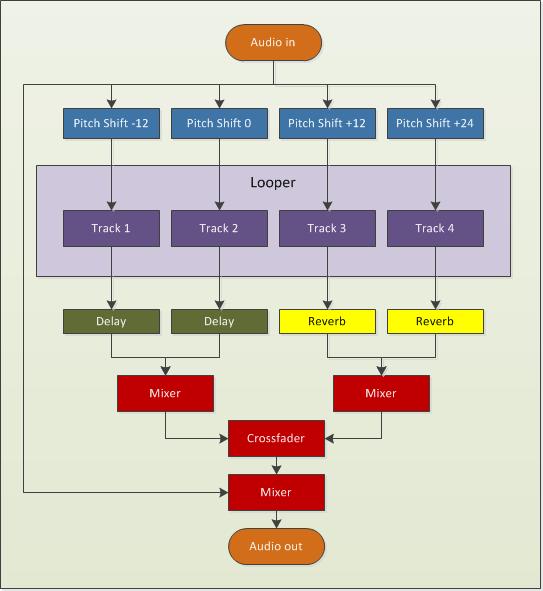
This is the audio flow I came up with:
V set flow
Incoming audio is sent to outputs and also split to four tracks on a multitrack looper.  Before reaching the looper, each signal path goes through a pitch shifting effect.  Each track then goes to its own post-looper effect.  Tracks 1 and 2 go to a delay while Tracks 3 and 4 go to a reverb.  Those two groups of tracks are mixed together and the result is sent to a crossfader than selects between these two sources.  The output of the crossfader is mixed with the audio input and sent out.  
My looper is Mobius.  I could’ve used another looper for this project, but my familiarity with this software and ease of implementation won out over wanting to play with another looper (I’ve had my eye on Augustus for a while).
My pitch shifter is Pitchwheel.   It’s a pretty interesting plugin that can be used on its own to create some interest in otherwise static loops.  Here, I’m only using it to shift the incoming audio, so it’s a pretty straightforward scenario.
My reverb is Eos by Audio Damage.  Do you know of a better sounding reverb that is also CPU friendly?  I can’t think of any.  My delay in this project is also by Audio Damage.  I’m using their Discord3 effect that combines a nice delay with some pitch shifting and filtering with an LFO thrown in to modulate everything.  This effect can really make things sound weird, but I’ll be using more subtle patches for this project.
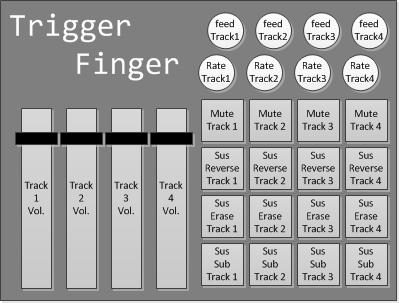
To control all of this, I’ll be using my trusty Trigger Finger to control the looper and my Novation Nocturn to control the effects.  Here’s what I decided to do for looper control:
V set control
Starting on the left, the faders will control the volume of my tracks in Mobius.  The pads and rotary dials on the right are grouped by column and correspond to tracks 1 to 4.  Each button perform the same function, but on different tracks.  The bottom row of pads call the sustain substitute function on a given track.  The row immediately above it does the same thing, but will also turn off the incoming audio, so it will act like my erase button (with secondary feedback determining how much the sounds will be attenuated).  The next row up sends the track playing backwards for as long as the button is pressed and the final row of buttons mutes a given track.  The first rotary dial controls the playback rate of a given tracks and the top one controls its secondary feedback setting.
To control the effects, this is the mapping I came up with for the Nocturn:
V set effect control
The crossfader is obviously used to control the crossfader between the two track groups.  After that, each track has two knobs: one that controls the amount of pitch shift to audio coming in to the track and another that controls the wet/dry parameters of the tracks post-looper effect.  The pads on the bottom will select different plugin patches, but the last one on the right is used to reset everything and prepare for performance.  Among other things, it will create an empty loop of a specified length in Mobius, which is needed before I can begin using the sustain substitute function.  Essentially, I’ll be replacing the silence of the original loop with the incoming audio.
One thing I won’t be doing is tweaking knobs and controlling every single parameter of my plugins.  I’ll rely on a few well-chosen and specifically created patches instead.  Also, keeping the effects parameters static can be an interesting performance strategy.  When I heard Mia Zabelka perform on violin and body sounds last year at the FIMAV, one thing that struck me was that she played her entire set through a delay effect without once modifying any of its parameters.  The same delay time and the same feedback throughout.  For me, this created a sense of a world in which her sounds existed or a canvas on which her work lived.  It’s like she changed a part of the physical reality of the world and it made it easier to be involved in her performance because I could predict what would happen.  Just as I can instinctively predict the movement of a bouncing ball in my everyday universe, I became able to predict the movements of sound within the universe she created for us with her performance.
Here's a recording I made tonight by fooling around with this setup:

Tuesday, May 29, 2012

New Album Release: sans jamais ni demain

I’ve just released a new album on Bandcamp: sans jamais ni demain. It’s a collection of experimental electronic music and recent explorations. Nothing grandiose, but I felt the need to update my bandcamp and share what I’ve been working on. A little more details about the songs:

the longing for repetition


“Happiness is the longing for repetition.”
---Milan Kundera
This is a song I made for CT-One Minute. All sounds are derived from a 10-second bass clarinet phrase sample that can be downloaded freely from the Philharmonia Orchestra's website. The sample was played back at various playback rates, forward and backward, through various envelopes using the Samplewiz sampler on my iPod. This performance was recorded in one take with all looping and effects done in samplewiz. No further editing or effects except for copy and pasting the beginning at the end to bring closure to the piece.
I approached samplewiz as a livelooper, since, in "note hold" mode, every note on the keyboard can be seen as a track on a multi-track looper (each with a different playback rate). For this piece, I used the forward and backwards loop settings in the wave window, so things get go sound a bit different. I added some delay and messed with the envelope and it started to sound nice. Once I had a good bed of asynchronous loops, I left "note hold" by tapping rather than swiping the control box (this kept the held notes). I then changed the settings around and played over the loops without "overdubbing".
Samplewiz is quite powerful... You can also change the loop start and end points in between notes to add variety, without affecting the notes that are already being held.

tutus de chemin


This is the soundtrack for a short film I made in a weekend with my wife. I started with a vocal recording of my wife that I sent through Paul's Extreme Sound Stretch. The resulting audio file was played back as a looop in Bidule. I sent the audio to a pitch shifting plug-in (I believe I was using PitchWheel at the time) and then to a midi gate group and finally to the Mobius looper. I performed the sounds two-handed on my Trigger Finger. One hand was controlling a fader that was assigned to pitch shifting and the other was triggering pads to control the midi gate (the note envelope) and various functions in Mobius.

Three of a kind


This piece started out as an assignment for a course in Electroacoustic composition I took at SFU a few years ago.  The sound source was a homemade instrument, but everything was mangled and cut-up.  This piece features heavy use of the short loop fabrication technique familiar to readers of this blog.  I used Acid to assemble everything and add some effect automation throughout the piece.

le train


This is the soundtrack to a short animation film I made last year.  I used Soundgrain to isolate parts of the original sound's spectrum and used that software to create loops that I mixed  while recording.  I think this musical cutup is well-matched with the visual cutup it was meant to accompany.

Game music


This songs was made using my soon to be released iOS app: BreakOSC!  This app is a game that sends OSC messages based on in-game events.  In this case, when the ball hit blue and green bricks, Bidule triggered four instances of iZotope's Iris.  The paddle served as a cross-fader and mixed all those sounds together.  The results were sent to a generous amount of reverb courtesy of Audio Damage's Eos.

sans jamais ni demain


Another composition I made for the aforementionned course in electroacoustic composiiton I took at SFU.  The only sound source for this piece is a recording of myself reading an old poem I wrote in high-school.  The slow moving textures were made by isolating parts of those words, slowing them down and layering them over each other to create very long notes of varying pitch that fade in and out over time.  The more rythmic stuff I made using a now familiar technique.

July 8 2011


This piece is a recording of a live (from my basement) performance of what will one day become my meta-trombone.  A short loop is created at the top (what is heard twice in the beginning) and then altered in different ways determined by trombone performance.

Twice through the looking glass


This song was also made for CT-One Minute using the exact same sound source as the longing of repetition. This time, however, I used Iris to change the character of the sound and created two different sound patches.  I made two recordings with each of these patches by triggering the sounds with my new Pulse controller.  My three-month old daughter also took part by adding her own surface hitting contributions, making this our first father-daugther collaboration.  Once I had made these two recordings, I brought them in Bidule and placed them into Audio file players.  The amplitude of output of each player was controlled via faders on my Trigger Finger and the result was recorded to file.

Wednesday, May 2, 2012

Displaying musical notation in iOS


musical notation on iOS

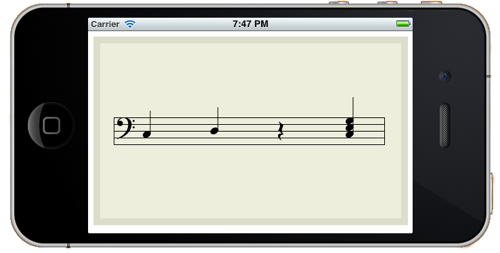
In case you're wondering, the easiest way I've found to display programmatically generated musical notation on the iPhone is with VexFlow.  It's a javascript library, so this means I have to put it in a UIWebView object through an html document that loads all the relevant files.  To call the javascript functions, I send a stringByEvaluatingJavaScriptFromString:  message to the UIWebView object.  It all works very well, so that takes care of the uninteresting part of that project…  now I get to learn all I can about algorithmic composition!

Wednesday, April 18, 2012

News from the trenches of augmented instrument design

Hey folks, out here in the perimeter, things are coming together.  I purchased an Arduino and an ultrasonic rangefinder and I hope to have them talking to each other soon.  Meanwhile, I’ve been exercising my iOS development chops in a few different ways.

First, working with libpd, I’ve built a rudimentary iOS music application that sends OSC messages to my computer.  This is a simple app that I made to see how hard it would to develop an iOS app to take care of the OSC messaging coming from the meta-trombone.  The good news: libpd is awesome and quite easy to integrate into an iOS development project.

If you’ve been living under a rock or you’ve somehow missed the Pure Data renaissance, libpd allows developers to embed a pd patch within an application.  I can create all the MIDI/OSC and audio elements graphically within pd and embed that within an iOS app.  All I need to do is make the user interface send messages to the pd patch (and back the other way as required).  This significantly reduces the learning curve for creating music apps for iOS.

This brings us to my second iOS project.  I’ve been designing a game that sends OSC messages based on in-game events.  The user can setup the game levels and specify what OSC message is sent for each in-game event.  For instances, if two objects collide, a note is played.  Likewise the position of an object on screen can be mapped to parameters of an effect.  I don’t want to give away too many details on this one yet, so stay tuned for details (and let me know if you want to beta test).

My third iOS project sends and receives signals to and from the Arduino through the RedPark serial cable.  I’m quite excited about what this makes possible… any sensors and all the world of physical computing over which the arduino reigns can be incorporated into an iOS app.  If you’ve been paying attention, combining that with libpd allows for a very compelling array of possibilities.  Here’s the picture: the arduino handles the sensors and sends signals to your iDevice, which is used for display, input, networking, audio generation, playback and DSP.

From the start, I intended to use an iTouch in my meta-trombone project.  At first I thought I would use it as a heads-up-display and as an input device to select patches using touchOSC.  It’s becoming clear that it will do a bit more work…  my current approach is to use the arduino to determine slide position and trombone notes.  The iTouch will receive this information through the RedPark cable and send OSC signals to my MacBook based on the patch selected through the user interface of the software that it is running.  The iTouch will be mounted on the trombone close to my eyes.  I will navigate the user interface with a footswitch, with a key/joystick in my left hand and/or with its touch interface.

The iTouch will also display algorithmically generated notation based on the last couple notes I played (and/or previously composed fragments).  I find the idea of using notation interesting, since, for the meta-trombone, traditional notation will not only describe musical motives, but parameter changes as well.


Friday, October 14, 2011

Fall odds and ends


Internet woes
The internet has not been all good to me recently. I often shop online and encourage everyone do so, but when things go bad, it can (apparently) be a pain to get your money back.

My first (and second) internet mishap happened while I was trying to buy an RME Fireface 800 on Ebay. On two separate occasions, after winning the item and paying through PayPal, Ebay removed the listing because they suspected it was fraudulent. I got my money back in full in both cases, but it took a couple weeks for PayPal to go through its formal complaint process. Weeks during which my money was tied up and I couldn't use it to buy a Fireface 800. After going through this twice and suffering through another bad experience (see below), I decided to buy a new interface from a Canadian store. The transaction went smoothly and I had the interface within the week.

Internet woes (Part II)
My internet misfortunes continued as a result of a transaction I initiated in late June when I ordered a mute from an online retailer. This mute has a microphone pickup inside it and I intended to use it in my meta-trombone project, so I was quite keen to get it (and very happy to find a retailer in North-America). But it wasn’t coming. So I contacted the seller in July and again in August. By mid-August I wanted my money back. When I received no reply from the seller, I lodged a complaint with the Better Business Bureau and informed the seller. No reply from the seller.

Early in September, I reviewed the seller’s novel approach to customer service on an internet forum and I informed the seller. The seller promptly went apeshit. Whereas he could’ve taken this opportunity to renew communications with me and apologize for missing my previous correspondence, he called me a liar and publicly insulted me on the forum. Certainly not the professional behaviour one expects from a seller… Regardless, the seller agreed to refund me (less restocking fees). However, the seller also sent an email to the Better Business Bureau impersonating me in which ‘I’ apologized and withdrew my complaint. I won’t actually name the seller (due to repeated threats of legal actions), but I would encourage any reader to contact me before placing any significant order for musical equipment from an online retailer located in the north-eastern United States.

Computer woes
One thing you shouldn’t do with your MacBook Pro is to drop it on the floor. Take my word for it. No need to try it for yourself. This could’ve been much worse, but I got off with cosmetics bruises and a dead hard-drive. This is not too problematic, since I’m rather paranoid about backing-up my data. Up until now, I’ve been using CrashPlan to backup my main drive and while I thought it worked quite well, having spent some time with its restore function has made me yearn for another approach. I’ve since switched to Carbon Copy Cloner and I heartily recommend it for all your OS X backup needs. The best thing about it is that it creates a bootable duplicate of your disk. This means there is no down time and no need to reinstall software (and search everywhere for licence information). Also, it doesn’t put your files in an undecipherable proprietary format that makes it impossible to locate files without using the software in question (that is so 20th century).

Learning stuff
Having successfully demonstrated competency in rudimentary university-level mathematics, I’ve started learning computer programming at l’Université du Québec en Outaouais (in accordance with my previously mentioned epiphany). I’m currently enrolled in the introductory Java programming course, but after going through the Stanford introductory course, this one is a breeze. Feeling inadequately challenged, I also signed-up for a free online course at Stanford in artificial intelligence. I’m one of 180,000 or so students enrolled. That’s nuts.

I’ve also been teaching myself to code in Scheme. Not only because it’s the coolest programming language I’ve ever seen, but mainly because it’s the lingua franca of livecoding (see Impromptu comments below).

To solidify my hold on both mathematics and programming, I’ve been using Java, C++ and Scheme to solve mathematical problems posted on Project Euler. I’ve only solved 19 problems to date and I wish I had more time to spend on these, since it’s great fun, it makes me feel smart and I’m learning stuff. What else can you ask for?

Meta-trombone
Not much development since I last posted about the meta-trombone, but a lot of conceptual work happening behind the scenes (mostly thinking about effects). I’m now very interested in Impromptu and its novel blend of coding, AudioUnits, OSC and MIDI. I’m not sure exactly how it will be involved in this project, but I know it will be. One thing that Impromptu allows is to rapidly create AU by compiling using its AU wrapper. This would make it possible to create some signal processing wonders of my own and also to implement some of my Bidule patches as compiled code, thus increasing efficiency. Normally, there’s little drawback to using Bidule, but my audio to midi patch is a bit of a drain on the CPU and could be improved by moving it to Impromptu. This livecoding platform also has some interesting video applications that I’m more than willing to explore.

Camera (film)
I purchased an old canon film camera and a couple of lens online and found an old light table locally. I’m amazed at how cheaply this equipment can be had… an equivalent digital setup would’ve meant an investment of several thousands of dollars. For a bit over $200, I have seven lens, an SLR and a light table. Amazing.

My main reason for getting these technological vestiges of a previous century is to further explore a collage technique that I learnt from Collin Zipp when I attended a workshop at Daïmon. During this workshop, I created a little video from cut-up and scratched film negatives. While the video is ok, what struck me was that a lot of the individual frames made stunning images in themselves and I’d like to explore that in the coming months, perhaps using this technique to create a short comic.

Saturday, July 9, 2011

Meta-trombone - part II

These last few weeks have seen much development on software side of the meta-trombone controller.  I created a monstrous Bidule patch to instantiate my vision of what this integrated controller/instrument should be.  

Here's a top level view of the patch:


The audio signal from the trombone goes to an audio to midi converter that I developed to extract midi notes from my performance.  It also goes to external outputs and/or Mobius looper through an audio matrix that makes possible all the complex routing that my setup requires.  Finally, trombone sound is also fed to an envelope follower that, depending on performance mode, can modulate the playback of Mobius' tracks (more on this below).

Here's a look at the top level of the audio to midi group:

This group is based on an audio to midi converter I found on the Bidule forum.  From what I gathered looking at this group, it seems to determined pitch by comparing incoming notes to a delayed version.  The amount of delay is based on frequency and sampling rate.  When the two signals are combined, if the frequency matches what was fed to the delay, they are phase-cancelled to near 0.  This process is done for every note we want to evaluate and the note closest to 0 is the one returned.  

The original group work well enough, but it was a bit sluggish for my taste and used up considerable system resources.  My approach, as I indicated earlier (and as implemented by students at Cornell), is to reduce the number of notes the system has to evaluate by tracking the position of the trombone slide and evaluating only for those notes that can be produced at the current slide position.  I'm still working on a reliable way to track slide position, but right now this audio to midi converter works quite well for all notes in first (closed) position.

The midi notes that it generates are sent to Mobius to trigger various scripts depending on the performance mode currently selected.  Before I describe these various modes, let's take at the control interface that I created in TouchOSC that allows me to control this complex patch with my iPod Touch.


The first column to the left selects the performance mode.  The one immediately to its right selects the Mobius track that is effected by the performance mode.  The red column selects the Mobius track that will record performance from either the trombone, an effected Mobius track or both.  The last column on the right turns the audio output for that track on and off.  Finally, the purple button on the bottom determines wether trombone sound is sent to external outs and Mobius tracks.

While this interface may look simple enough, there are many logical conditions that are evaluated behind the scenes each time a button is pressed.  For instance, if Play 1 and Rec 1 are selected, the audio from track 1 is not actually fed into itself.  If Rec 2 is selected and Out 2 is off, the system turns it on automatically.  And so on...  these logical conditions are the core assumptions I built into the system that will make it behave as I intend it to.  A big part of that, was defining how the performance modes would affect the various system states to produce the required results.

Performance modes
Starting with the simplest, in Off mode the midi notes interpreted from the trombone performance are discarded.  In synth mode, the notes played on the trombone modify the playback rate of the Play track in Mobius.  Also, the playback of that track will be modulated according to the trombone performance by virtue of the envelope follower.

In Envelope mode, the track playback is also modulated to the envelope follower, but the midi notes no longer change the playback rate.  Instead, each note played on the trombone changes the playback location of the loop.  Trigger mode is the same as envelope mode, but without the envelope!

Things to do
I still need to complete the pitch recognition system by developing hardware to track slide position.  I also need to develop the midi module element of the system.  Presently, I'm thinking of adding an arpeggiator, a quantizer and perhaps a midi looper.  Next, I will add effects!  Not only do I want to modify the input trombone sound and the loops, but I also would like to map trombone performance to changes in effect parameters and effect selections.  For instance, I could map a filter's cut-off frequency to trombone notes so that playing a certain note would emphasize a specific spectral aspect of the effected loop.

How will it sound?
While there's no way no know exactly what kind of music I'll end up producing once the whole system is up and running, below is a recording of a recent practice sessions that used only the Synth and Envelope mode.  No effects were added and it is rather poorly mixed, but it does, I believe, show promise.  One thing I'd like to note about the performance is that everything you hear, with the exception of the solo later on in the piece, is created from "performance" of the first recorded loop (what you hear twice in the beginning).